INSTAGRAM & ACCESSIBILITY
A usability study and redesign for eye gaze users.
Instagram is one of the most widely used social platforms in the world - but for adolescents who rely on eye gaze devices, it was virtually unusable. As the UX Researcher and Designer on this project, I conducted mixed methods research with 5 eye gaze device users in a school environment - identifying three critical usability barriers through observational research and in-person interviews, and translating those findings into an accessible redesign built specifically for how this population navigates the world
Overview
MY ROLE:
UX Researcher & Designer
METHODS:
Observational Research · In-person Interviews · Contextual Inquiry · Usability Evaluation
PARTICIPANTS:
5 adolescents · Eye gaze users · Ages 12-18
DURATION:
Feb 2025 - May 2025
CONTEXT:
School environment
Preview
Watch the redesigned Instagram experience on an actual eye gaze device.
SECTION 1
PROBLEM
I worked at a school in Brooklyn, NYC, with students who use eye gaze devices and wanted Instagram accounts - so we created them. What we discovered next changed everything.
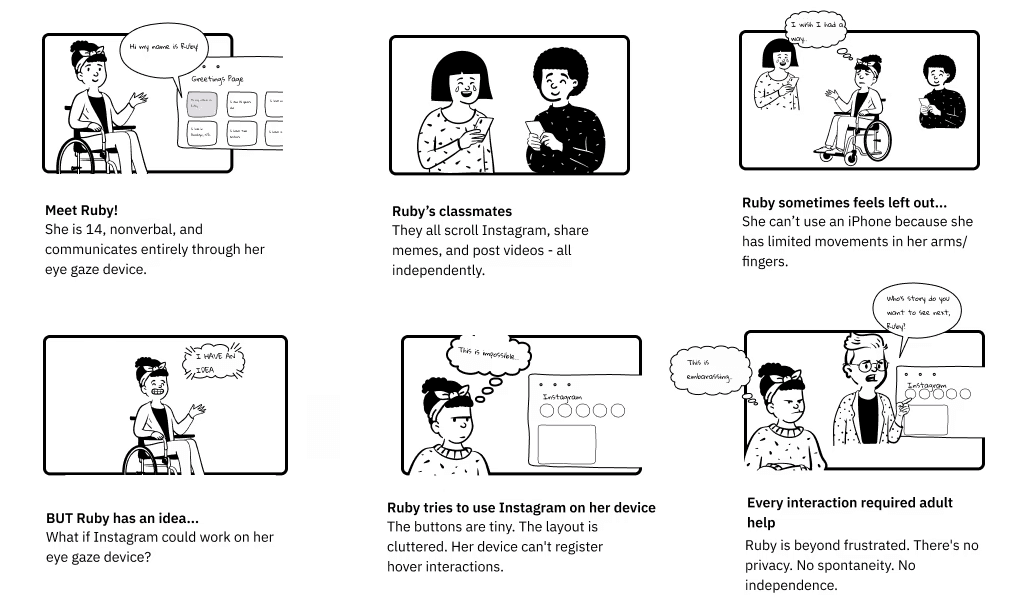
Instagram wasn't built with everyone in mind. For users who navigate entirely through eye movements, the experience was nearly impossible. Tiny buttons, cluttered layouts, and hover interactions that eye gaze technology simply couldn't register made the platform effectively unusable - even on compatible browsers like Chrome.
My students deserved to connect with the world the same way everyone else does. So I decided to do something about it.
STORY BOARD
SECTION 2
RESEARCH
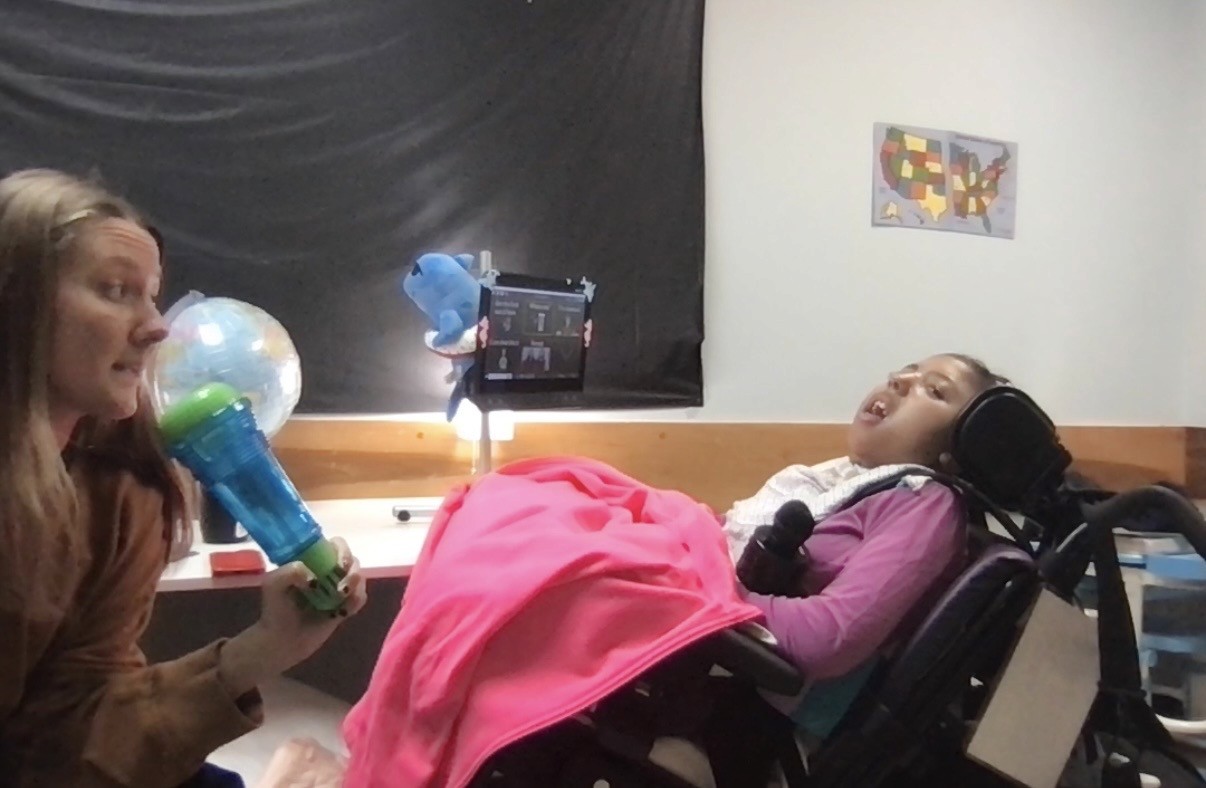
The problem was real and the users were right in front of me. I went straight to the source - conducting qualitative mixed methods research with 5 adolescent eye gaze device users in their school environment:
PARTICIPANTS
5 adolescent users · Ages 12-18 · Neurodevelopmental disorder diagnoses · Nonverbal · Wheelchair users (non-mobile)· 100% daily device users · 43% use outside school environment
METHODS
1. Observational Research
On-site sessions within the school environment to capture naturalistic user behavior in context.
I chose this method because self-reported data alone would not capture the real-time frustrations and workarounds users employed when attempting to navigate platforms.
Usability testing and user feedback analysis
Interaction design and micro-animations
2. In-person interviews
Structured 1:1 conversations with each participant to gather detailed qualitative insights about their goals, frustrations, and desired experiences.
I chose in-person over remote to accommodate the communication needs of nonverbal participants using AAC devices.
Infographics and data visualization
Custom illustrations and icons
Stats
When asked about their relationship with social media, our participants were clear:
0%
0%
Want to use social media
0%
0%
Want to use social media
0%
0%
Want to better connect with friends
0%
0%
Want to better connect with friends
0%
0%
Report fatigue using current platforms
0%
0%
Report fatigue using current platforms
Three Qualitative themes
Beyond the numbers, three critical themes emerged from our observational sessions and interviews:
1.
Forced dependence eliminates autonomy
Despite devices being technically capable of running Instagram, every participant depended entirely on an adult to navigate the platform. This eliminated spontaneity, privacy, and the fundamental sense of self-determination in social interactions.
2.
Exclusion from peer culture causes real harm
One participant could watch classmates create content but couldn't join. Another wanted to joke with peers but had no way to initiate it independently.
3.
Users have clear vision for their digital identity
Participants articulated specific goals: to build a digital presence that felt authentically theirs and to create community on their own terms. The desire wasn't for a simplified version of Instagram..it was for the same experience everyone else takes for granted.
SECTION 3
BACKGROUND
ABOUT EYE GAZE DEVICES
To understand the challenge, it helps to know how eye gaze technology actually works:

THE DEVICE
TOBII DYNAVOX
A speech generating tool about the size of a laptop, mounted in front of the user on their wheelchair. Runs apps, browsers, and communication tools. A common eye gaze device is the Tobii Dynavox.
HOW IT WORKS
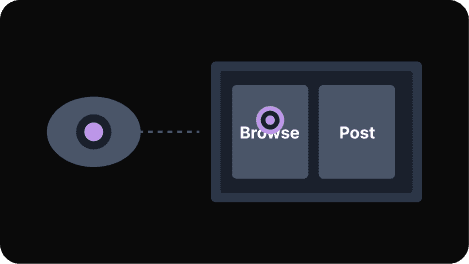
EYES AS A CURSOR
A camera tracks the user's gaze. Looking at something = pointing at it. Dwelling on it = clicking it.
THE PROBLEM
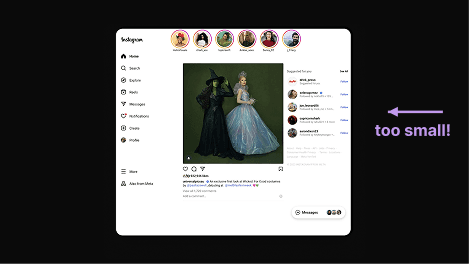
BUILT FOR FINGERS
Instagram's tiny buttons and cluttered layout were impossible to navigate with eye gaze technology.
Usability Barriers
Across all five participants, I noticed that three usability barriers consistently prevented independent use of the platform:
1.
Tap targets are too small to select accurately
Tap targets are too small to select accurately
2.
Hover interactions don't register with eye gaze
Most buttons fall below the minimum size for reliable dwell-click activation
3.
Complex navigation demands precise motor control
Multi-step flows overwhelm users who navigate entirely through eye movement
SECTION 4
Design Approach
From findings to design
Every design decision traces back to a specific barrier observed in research.
1.
Large accessible targets
120x120px minimum to accommodate eye gaze precision ranges and reduce selection errors
Addresses barrier 1 - tap targets too small
2.
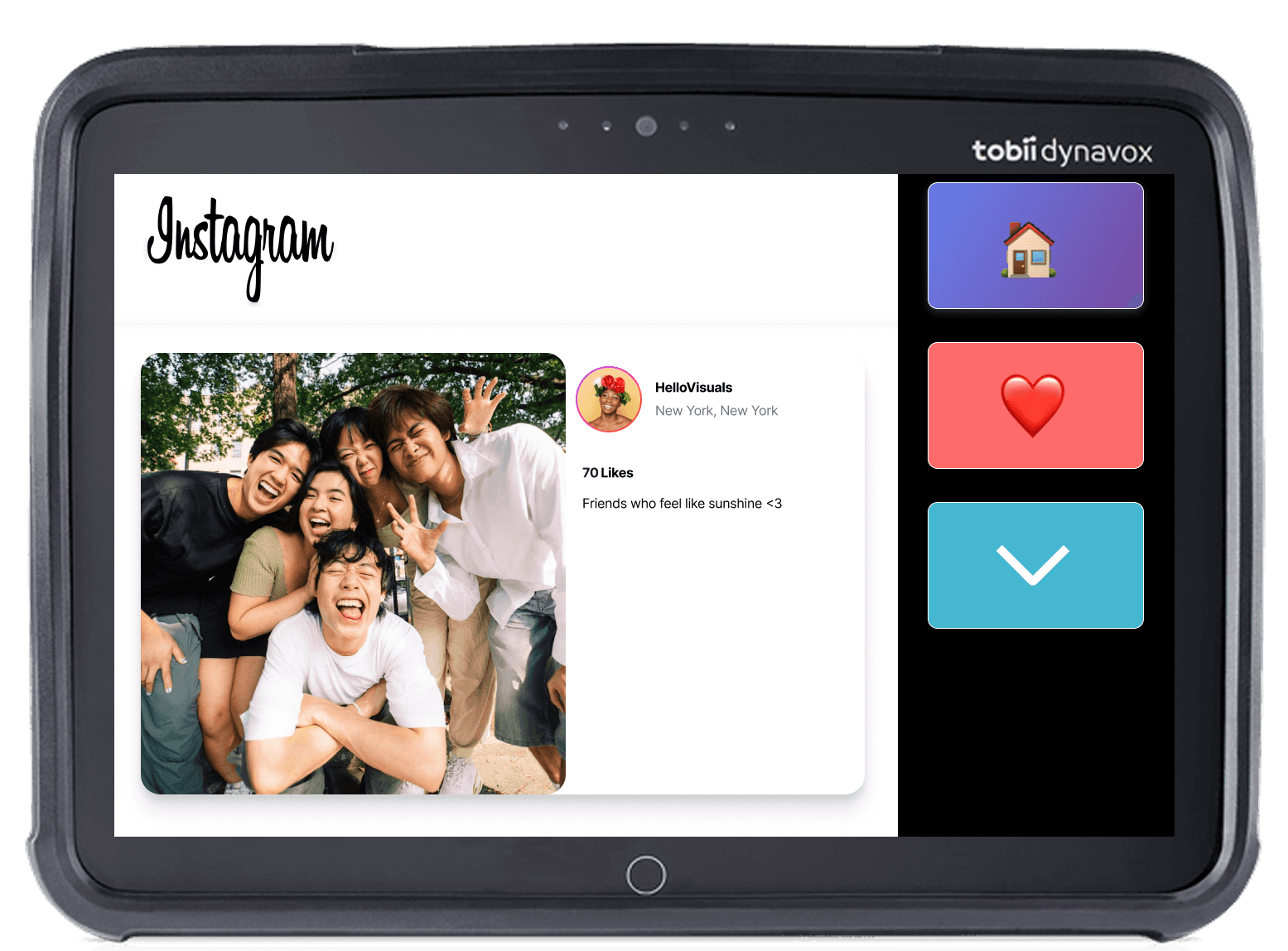
Side panel with always-visible action buttons
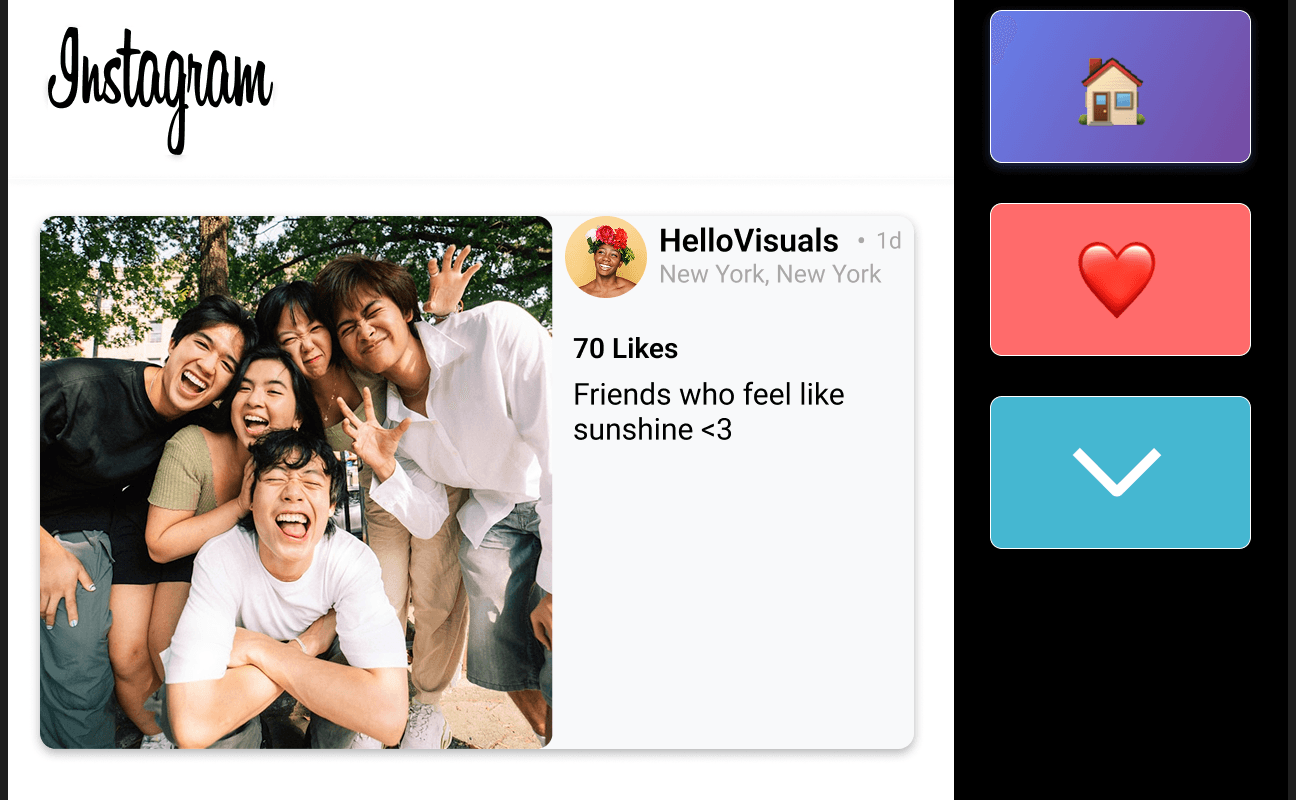
Like, scroll, and home buttons are permanently visible on the right side of the screen - no hover or extra steps needed to find them
Addresses barrier 2 - hover interactions
3.
Simplified information architecture
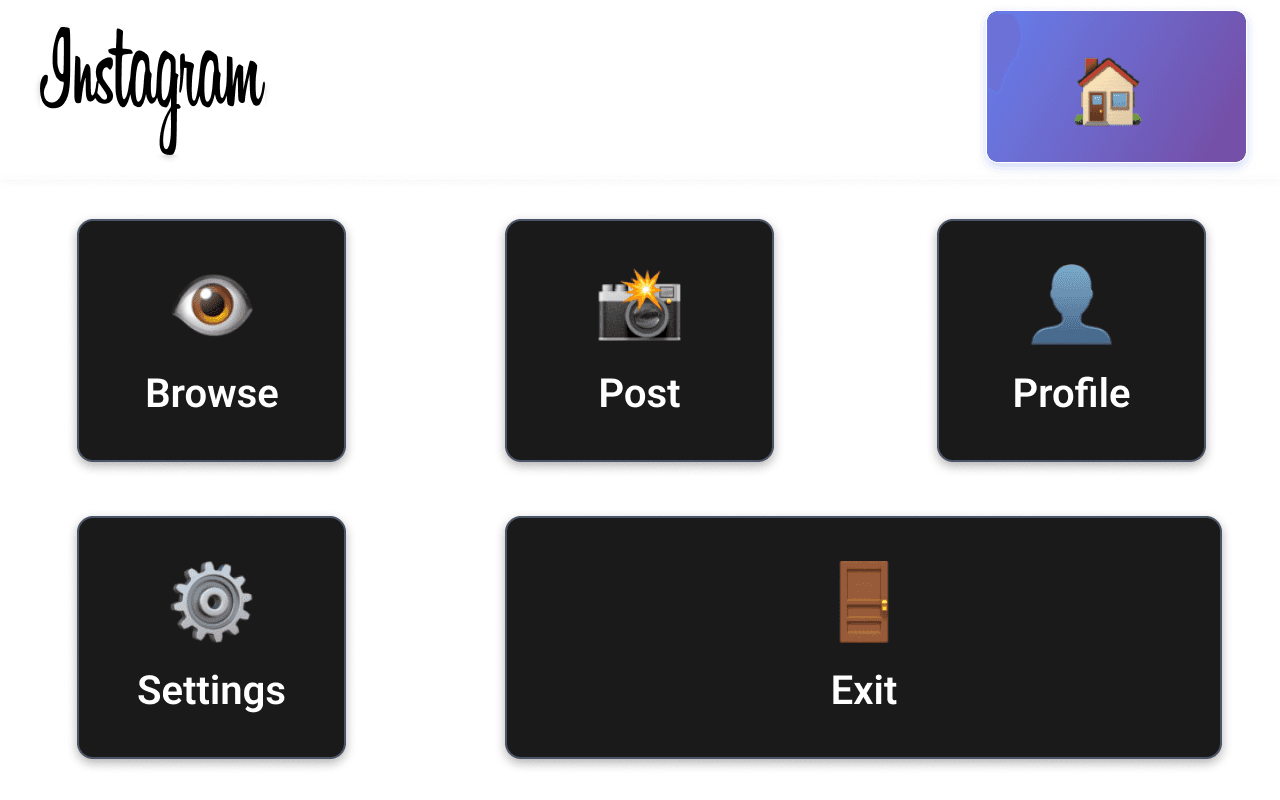
Five clearly labeled top-level buttons replace Instagram's full navigation - no nested menus, no extra steps
Addresses barrier 3- navigation complexity
SECTION 5
Final Designs
The Home Page
Users navigate using large dwell buttons eliminating the need for precise scrolling through small icons.
Browsing Feed
Visual complexity is reduced and direct access tp like and comment actions is surfaced.
Dwell feedback system
A visual fill animation confirms when a button is being activated - making every interaction predictable and independent.

SECTION 6
Impact & Metrics
Important: Not tested yet
After completing the redesign, I was no longer working at the school where my participants were. Because of that, I wasn't able to bring the designs back to test with them. The metrics below are what I would measure, and the research steps that follow are exactly how I'd do it.
Measuring success
Each metric below maps directly to a usability barrier identified in research. This is how I would know if the redesign actually worked.
Independent task completion
ALL BARRIERS
The core goal of the entire redesign was to enable participants to use Instagram without adult assistance. Every barrier - hover interactions, target size, and navigation complexity - contributed to 100% dependence on an adult. If this number moves, the design worked.
Baseline
~0% adult assisted
Target
80% unassisted
Task completion time
BARRIER 3
Complex multi-step navigation meant simple tasks took far longer than they should - when they were completable at all. Measuring time-on-task shows whether simplifying the information architecture made the experience faster and less effortful.
Baseline
Unmeasured
Target
50% reduction
User fatigue
BARRIERS 2+3
60% of participants reported fatigue during sessions - a direct result of misfiring on small targets and navigating complex flows repeatedly. Larger targets and simplified navigation should meaningfully reduce the cognitive and physical effort required.
Baseline
60% reported fatigue
Target
Measurable reduction
User satisfaction
ALL BARRIERS
Participants expressed a clear desire to use Instagram independently and on their own terms. Satisfaction measures whether the redesign actually delivered that experience - not just technically, but in a way that felt meaningful and empowering to users.
Baseline
Unmeasured
Target
4.5/5 usability scale
What i'd test next
Four research directions informed directly by what participants told me they needed.
1.
Moderated usability testing with eye gaze device users
Structured sessions to measure task completion rates, error rates, and time-on-task across the redesigned interface.
2.
A/B testing of button sizes and dwell timing thresholds
Compare performance across different target sizes and activation timing to find the optimal configuration for this user population.
3.
Longitudinal engagement tracking
Structured sessions to measure task completion rates, error rates, and time-on-task across the redesigned interface.
4.
Expansion to TikTok, FaceTime, and texting
All three were cited directly by participants as platforms they wanted to access - making them the natural next research priorities.
SECTION 7
Reflection
What this project reinforced: Accessibility isn't about compliance - it's about autonomy. My participants weren't asking for accessibility features. They were asking to participate in the same social world as their peers. That distinction shaped every design decision I made.
What I'd do differently: I would involve participants as co-designers from the start..not just as research subjects but as active collaborators in generating solutions. I would also expand participant diversity across device types and usage contexts, and validate technical feasibility with an AT engineer from day one rather than the design phase.
What this taught me about research: The numbers matter -100% wanting social media, 60% experiencing fatigue. But the stories behind the numbers are what drove the design. Ruby watching classmates film content she couldn't participate in. Another student wanting to make friends laugh but having no way to initiate it. Good research surfaces both the data and the humanity. That's what I hope to carry into every project.
More Projects



INSTAGRAM & ACCESSIBILITY
A usability study and redesign for eye gaze users.
Instagram is one of the most widely used social platforms in the world - but for adolescents who rely on eye gaze devices, it was virtually unusable. As the UX Researcher and Designer on this project, I conducted mixed methods research with 5 eye gaze device users in a school environment - identifying three critical usability barriers through observational research and in-person interviews, and translating those findings into an accessible redesign built specifically for how this population navigates the world
Overview
MY ROLE:
UX Researcher & Designer
METHODS:
Observational Research · In-person Interviews · Contextual Inquiry · Usability Evaluation
PARTICIPANTS:
5 adolescents · Eye gaze users · Ages 12-18
DURATION:
Feb 2025 - May 2025
CONTEXT:
School environment
Preview
Watch the redesigned Instagram experience on an actual eye gaze device.
SECTION 1
PROBLEM
I worked at a school in Brooklyn, NYC, with students who use eye gaze devices and wanted Instagram accounts - so we created them. What we discovered next changed everything.
Instagram wasn't built with everyone in mind. For users who navigate entirely through eye movements, the experience was nearly impossible. Tiny buttons, cluttered layouts, and hover interactions that eye gaze technology simply couldn't register made the platform effectively unusable - even on compatible browsers like Chrome.
My students deserved to connect with the world the same way everyone else does. So I decided to do something about it.
STORY BOARD
SECTION 2
RESEARCH
The problem was real and the users were right in front of me. I went straight to the source - conducting qualitative mixed methods research with 5 adolescent eye gaze device users in their school environment:
PARTICIPANTS
5 adolescent users · Ages 12-18 · Neurodevelopmental disorder diagnoses · Nonverbal · Wheelchair users (non-mobile)· 100% daily device users · 43% use outside school environment
METHODS
1. Observational Research
On-site sessions within the school environment to capture naturalistic user behavior in context.
I chose this method because self-reported data alone would not capture the real-time frustrations and workarounds users employed when attempting to navigate platforms.
Usability testing and user feedback analysis
Interaction design and micro-animations
2. In-person interviews
Structured 1:1 conversations with each participant to gather detailed qualitative insights about their goals, frustrations, and desired experiences.
I chose in-person over remote to accommodate the communication needs of nonverbal participants using AAC devices.
Infographics and data visualization
Custom illustrations and icons
Stats
When asked about their relationship with social media, our participants were clear:
0%
0%
Want to use social media
0%
0%
Want to use social media
0%
0%
Want to better connect with friends
0%
0%
Want to better connect with friends
0%
0%
Report fatigue using current platforms
0%
0%
Report fatigue using current platforms
Three Qualitative themes
Beyond the numbers, three critical themes emerged from our observational sessions and interviews:
1.
Forced dependence eliminates autonomy
Despite devices being technically capable of running Instagram, every participant depended entirely on an adult to navigate the platform. This eliminated spontaneity, privacy, and the fundamental sense of self-determination in social interactions.
2.
Exclusion from peer culture causes real harm
One participant could watch classmates create content but couldn't join. Another wanted to joke with peers but had no way to initiate it independently.
3.
Users have clear vision for their digital identity
Participants articulated specific goals: to build a digital presence that felt authentically theirs and to create community on their own terms. The desire wasn't for a simplified version of Instagram..it was for the same experience everyone else takes for granted.
SECTION 3
BACKGROUND
ABOUT EYE GAZE DEVICES
To understand the challenge, it helps to know how eye gaze technology actually works:
THE DEVICE
TOBII DYNAVOX
A speech generating tool about the size of a laptop, mounted in front of the user on their wheelchair. Runs apps, browsers, and communication tools. A common eye gaze device is the Tobii Dynavox.
HOW IT WORKS
EYES AS A CURSOR
A camera tracks the user's gaze. Looking at something = pointing at it. Dwelling on it = clicking it.
THE PROBLEM
BUILT FOR FINGERS
Instagram's tiny buttons and cluttered layout were impossible to navigate with eye gaze technology.
Usability Barriers
Across all five participants, I noticed that three usability barriers consistently prevented independent use of the platform:
1.
Tap targets are too small to select accurately
Tap targets are too small to select accurately
2.
Hover interactions don't register with eye gaze
Most buttons fall below the minimum size for reliable dwell-click activation
3.
Complex navigation demands precise motor control
Multi-step flows overwhelm users who navigate entirely through eye movement
SECTION 4
Design Approach
From findings to design
Every design decision traces back to a specific barrier observed in research.
1.
Large accessible targets
120x120px minimum to accommodate eye gaze precision ranges and reduce selection errors
Addresses barrier 1 - tap targets too small
2.
Side panel with always-visible action buttons
Like, scroll, and home buttons are permanently visible on the right side of the screen - no hover or extra steps needed to find them
Addresses barrier 2 - hover interactions
3.
Simplified information architecture
Five clearly labeled top-level buttons replace Instagram's full navigation - no nested menus, no extra steps
Addresses barrier 3- navigation complexity
SECTION 5
Final Designs
The Home Page
Users navigate using large dwell buttons eliminating the need for precise scrolling through small icons.
Browsing Feed
Visual complexity is reduced and direct access tp like and comment actions is surfaced.
Dwell feedback system
A visual fill animation confirms when a button is being activated - making every interaction predictable and independent.
SECTION 6
Impact & Metrics
Important: Not tested yet
After completing the redesign, I was no longer working at the school where my participants were. Because of that, I wasn't able to bring the designs back to test with them. The metrics below are what I would measure, and the research steps that follow are exactly how I'd do it.
Measuring success
Each metric below maps directly to a usability barrier identified in research. This is how I would know if the redesign actually worked.
Independent task completion
ALL BARRIERS
The core goal of the entire redesign was to enable participants to use Instagram without adult assistance. Every barrier - hover interactions, target size, and navigation complexity - contributed to 100% dependence on an adult. If this number moves, the design worked.
Baseline
~0% adult assisted
Target
80% unassisted
Task completion time
BARRIER 3
Complex multi-step navigation meant simple tasks took far longer than they should - when they were completable at all. Measuring time-on-task shows whether simplifying the information architecture made the experience faster and less effortful.
Baseline
Unmeasured
Target
50% reduction
User fatigue
BARRIERS 2+3
60% of participants reported fatigue during sessions - a direct result of misfiring on small targets and navigating complex flows repeatedly. Larger targets and simplified navigation should meaningfully reduce the cognitive and physical effort required.
Baseline
60% reported fatigue
Target
Measurable reduction
User satisfaction
ALL BARRIERS
Participants expressed a clear desire to use Instagram independently and on their own terms. Satisfaction measures whether the redesign actually delivered that experience - not just technically, but in a way that felt meaningful and empowering to users.
Baseline
Unmeasured
Target
4.5/5 usability scale
What i'd test next
Four research directions informed directly by what participants told me they needed.
1.
Moderated usability testing with eye gaze device users
Structured sessions to measure task completion rates, error rates, and time-on-task across the redesigned interface.
2.
A/B testing of button sizes and dwell timing thresholds
Compare performance across different target sizes and activation timing to find the optimal configuration for this user population.
3.
Longitudinal engagement tracking
Structured sessions to measure task completion rates, error rates, and time-on-task across the redesigned interface.
4.
Expansion to TikTok, FaceTime, and texting
All three were cited directly by participants as platforms they wanted to access - making them the natural next research priorities.
SECTION 7
Reflection
What this project reinforced: Accessibility isn't about compliance - it's about autonomy. My participants weren't asking for accessibility features. They were asking to participate in the same social world as their peers. That distinction shaped every design decision I made.
What I'd do differently: I would involve participants as co-designers from the start..not just as research subjects but as active collaborators in generating solutions. I would also expand participant diversity across device types and usage contexts, and validate technical feasibility with an AT engineer from day one rather than the design phase.
What this taught me about research: The numbers matter -100% wanting social media, 60% experiencing fatigue. But the stories behind the numbers are what drove the design. Ruby watching classmates film content she couldn't participate in. Another student wanting to make friends laugh but having no way to initiate it. Good research surfaces both the data and the humanity. That's what I hope to carry into every project.
More Projects
INSTAGRAM & ACCESSIBILITY
A usability study and redesign for eye gaze users.
Instagram is one of the most widely used social platforms in the world - but for adolescents who rely on eye gaze devices, it was virtually unusable. As the UX Researcher and Designer on this project, I conducted mixed methods research with 5 eye gaze device users in a school environment - identifying three critical usability barriers through observational research and in-person interviews, and translating those findings into an accessible redesign built specifically for how this population navigates the world
Overview
MY ROLE:
UX Researcher & Designer
METHODS:
Observational Research · In-person Interviews · Contextual Inquiry · Usability Evaluation
PARTICIPANTS:
5 adolescents · Eye gaze users · Ages 12-18
DURATION:
Feb 2025 - May 2025
CONTEXT:
School environment
Preview
Watch the redesigned Instagram experience on an actual eye gaze device.
SECTION 1
PROBLEM
I worked at a school in Brooklyn, NYC, with students who use eye gaze devices and wanted Instagram accounts - so we created them. What we discovered next changed everything.
Instagram wasn't built with everyone in mind. For users who navigate entirely through eye movements, the experience was nearly impossible. Tiny buttons, cluttered layouts, and hover interactions that eye gaze technology simply couldn't register made the platform effectively unusable - even on compatible browsers like Chrome.
My students deserved to connect with the world the same way everyone else does. So I decided to do something about it.
STORY BOARD
SECTION 2
RESEARCH
The problem was real and the users were right in front of me. I went straight to the source - conducting qualitative mixed methods research with 5 adolescent eye gaze device users in their school environment:
PARTICIPANTS
5 adolescent users · Ages 12-18 · Neurodevelopmental disorder diagnoses · Nonverbal · Wheelchair users (non-mobile)· 100% daily device users · 43% use outside school environment
METHODS
1. Observational Research
On-site sessions within the school environment to capture naturalistic user behavior in context.
I chose this method because self-reported data alone would not capture the real-time frustrations and workarounds users employed when attempting to navigate platforms.
Usability testing and user feedback analysis
Interaction design and micro-animations
2. In-person interviews
Structured 1:1 conversations with each participant to gather detailed qualitative insights about their goals, frustrations, and desired experiences.
I chose in-person over remote to accommodate the communication needs of nonverbal participants using AAC devices.
Infographics and data visualization
Custom illustrations and icons
Stats
When asked about their relationship with social media, our participants were clear:
0%
0%
Want to use social media
0%
0%
Want to use social media
0%
0%
Want to better connect with friends
0%
0%
Want to better connect with friends
0%
0%
Report fatigue using current platforms
0%
0%
Report fatigue using current platforms
Three Qualitative themes
Beyond the numbers, three critical themes emerged from our observational sessions and interviews:
1.
Forced dependence eliminates autonomy
Despite devices being technically capable of running Instagram, every participant depended entirely on an adult to navigate the platform. This eliminated spontaneity, privacy, and the fundamental sense of self-determination in social interactions.
2.
Exclusion from peer culture causes real harm
One participant could watch classmates create content but couldn't join. Another wanted to joke with peers but had no way to initiate it independently.
3.
Users have clear vision for their digital identity
Participants articulated specific goals: to build a digital presence that felt authentically theirs and to create community on their own terms. The desire wasn't for a simplified version of Instagram..it was for the same experience everyone else takes for granted.
SECTION 3
BACKGROUND
ABOUT EYE GAZE DEVICES
To understand the challenge, it helps to know how eye gaze technology actually works:
THE DEVICE
TOBII DYNAVOX
A speech generating tool about the size of a laptop, mounted in front of the user on their wheelchair. Runs apps, browsers, and communication tools. A common eye gaze device is the Tobii Dynavox.
HOW IT WORKS
EYES AS A CURSOR
A camera tracks the user's gaze. Looking at something = pointing at it. Dwelling on it = clicking it.
THE PROBLEM
BUILT FOR FINGERS
Instagram's tiny buttons and cluttered layout were impossible to navigate with eye gaze technology.
Usability Barriers
Across all five participants, I noticed that three usability barriers consistently prevented independent use of the platform:
1.
Tap targets are too small to select accurately
Tap targets are too small to select accurately
2.
Hover interactions don't register with eye gaze
Most buttons fall below the minimum size for reliable dwell-click activation
3.
Complex navigation demands precise motor control
Multi-step flows overwhelm users who navigate entirely through eye movement
SECTION 4
Design Approach
From findings to design
Every design decision traces back to a specific barrier observed in research.
1.
Large accessible targets
120x120px minimum to accommodate eye gaze precision ranges and reduce selection errors
Addresses barrier 1 - tap targets too small
2.
Side panel with always-visible action buttons
Like, scroll, and home buttons are permanently visible on the right side of the screen - no hover or extra steps needed to find them
Addresses barrier 2 - hover interactions
3.
Simplified information architecture
Five clearly labeled top-level buttons replace Instagram's full navigation - no nested menus, no extra steps
Addresses barrier 3- navigation complexity
SECTION 5
Final Designs
The Home Page
Users navigate using large dwell buttons eliminating the need for precise scrolling through small icons.
Browsing Feed
Visual complexity is reduced and direct access tp like and comment actions is surfaced.
Dwell feedback system
A visual fill animation confirms when a button is being activated - making every interaction predictable and independent.
SECTION 6
Impact & Metrics
Important: Not tested yet
After completing the redesign, I was no longer working at the school where my participants were. Because of that, I wasn't able to bring the designs back to test with them. The metrics below are what I would measure, and the research steps that follow are exactly how I'd do it.
Measuring success
Each metric below maps directly to a usability barrier identified in research. This is how I would know if the redesign actually worked.
Independent task completion
ALL BARRIERS
The core goal of the entire redesign was to enable participants to use Instagram without adult assistance. Every barrier - hover interactions, target size, and navigation complexity - contributed to 100% dependence on an adult. If this number moves, the design worked.
Baseline
~0% adult assisted
Target
80% unassisted
Task completion time
BARRIER 3
Complex multi-step navigation meant simple tasks took far longer than they should - when they were completable at all. Measuring time-on-task shows whether simplifying the information architecture made the experience faster and less effortful.
Baseline
Unmeasured
Target
50% reduction
User fatigue
BARRIERS 2+3
60% of participants reported fatigue during sessions - a direct result of misfiring on small targets and navigating complex flows repeatedly. Larger targets and simplified navigation should meaningfully reduce the cognitive and physical effort required.
Baseline
60% reported fatigue
Target
Measurable reduction
User satisfaction
ALL BARRIERS
Participants expressed a clear desire to use Instagram independently and on their own terms. Satisfaction measures whether the redesign actually delivered that experience - not just technically, but in a way that felt meaningful and empowering to users.
Baseline
Unmeasured
Target
4.5/5 usability scale
What i'd test next
Four research directions informed directly by what participants told me they needed.
1.
Moderated usability testing with eye gaze device users
Structured sessions to measure task completion rates, error rates, and time-on-task across the redesigned interface.
2.
A/B testing of button sizes and dwell timing thresholds
Compare performance across different target sizes and activation timing to find the optimal configuration for this user population.
3.
Longitudinal engagement tracking
Structured sessions to measure task completion rates, error rates, and time-on-task across the redesigned interface.
4.
Expansion to TikTok, FaceTime, and texting
All three were cited directly by participants as platforms they wanted to access - making them the natural next research priorities.
SECTION 7
Reflection
What this project reinforced: Accessibility isn't about compliance - it's about autonomy. My participants weren't asking for accessibility features. They were asking to participate in the same social world as their peers. That distinction shaped every design decision I made.
What I'd do differently: I would involve participants as co-designers from the start..not just as research subjects but as active collaborators in generating solutions. I would also expand participant diversity across device types and usage contexts, and validate technical feasibility with an AT engineer from day one rather than the design phase.
What this taught me about research: The numbers matter -100% wanting social media, 60% experiencing fatigue. But the stories behind the numbers are what drove the design. Ruby watching classmates film content she couldn't participate in. Another student wanting to make friends laugh but having no way to initiate it. Good research surfaces both the data and the humanity. That's what I hope to carry into every project.