Oppia Foundation - Building Research from the Ground Up
A mixed methods evaluative study for a free, open-source platform delivering interactive, story-based education to children globally.

Oppia Foundation is a free, open-source learning platform serving 2M+ learners globally. As Lead UX Researcher, I built a mixed methods research program from the ground up - surfacing key usability gaps through dogfood testing, thematic analysis, and heuristic evaluation, and laying the foundation for the org's upcoming external user research.
Overview
MY ROLE:
Lead UX Researcher (Volunteer) · Co-leading the UXR Team with a colleague
METHODS:
Dogfood Testing · Thematic Analysis · Heuristic Evaluation · Source Triangulation · Stakeholder Presentation · Usability Testing (in progress)
TOOLS:
Figma · Google Slides · Google Chat · Claude (AI)
TIMELINE:
Feb 2026 - Present
TEAM:
2 UX Research Leads · 4 UX Researchers · 2 UX Writers · 7 UX Designers
ORGANIZATION:
ORG
Oppia Foundation · Nonprofit · Google Summer of Code org · Remote · Volunteer
A Special Tribute: To Hailey and Jesus
Before Oppia, I worked directly with children as a speech-language pathologist. My last job as an SLP will always stay with me - it was both a breaking point and the thing that guided me to where I am today.
I worked at a school in Brooklyn. Unexpectedly, one of my students, Hailey, passed away (2024). Then, almost four months later, I lost another, Jesus. It was the hardest thing I've ever navigated professionally - and personally.
Hailey was 11. Spunky, hilarious, always dancing, and loved eating junk food.
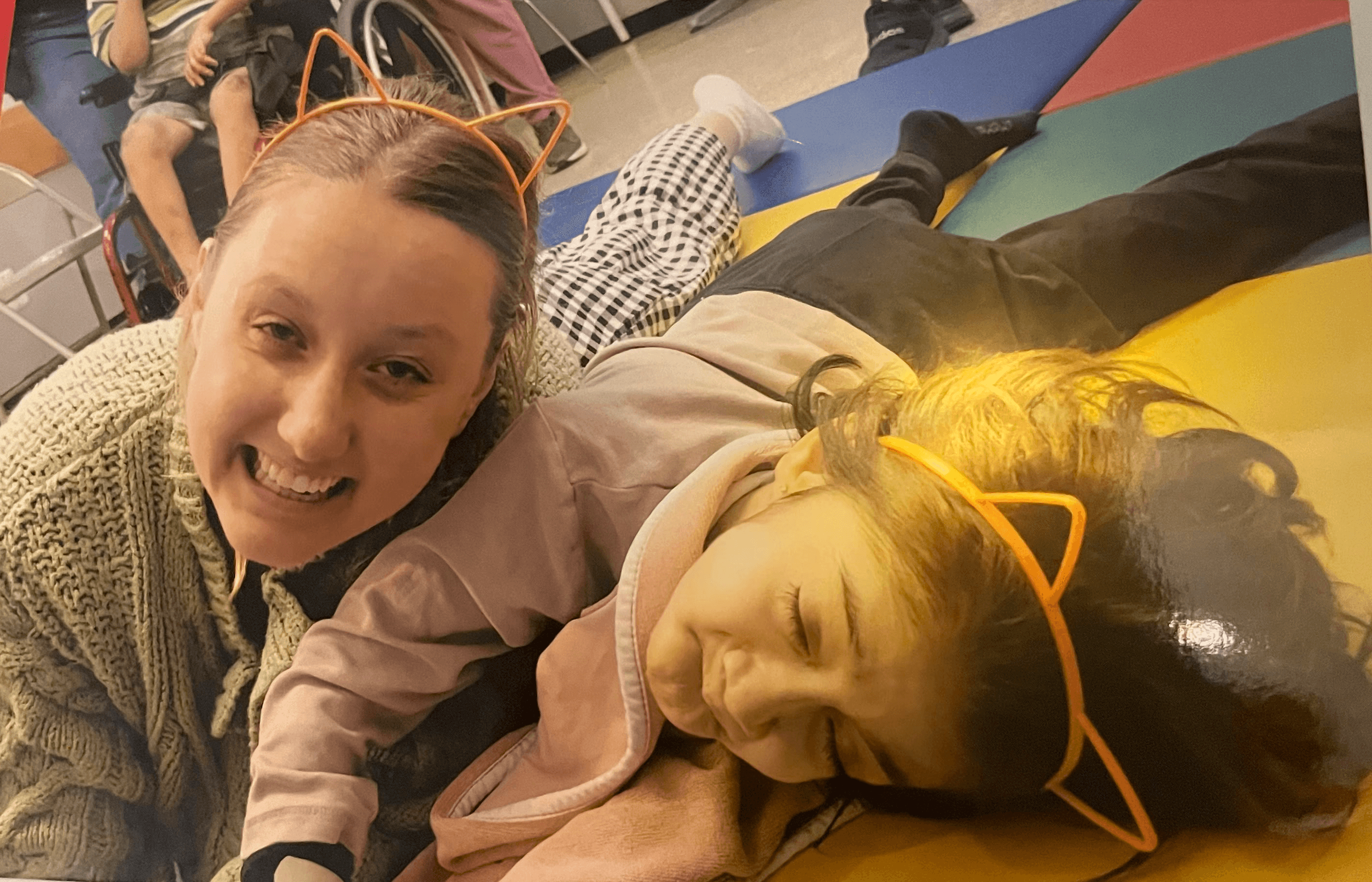
Billi (Me) and Hailey in Brooklyn, 2024
Jesus was 18. He loved Adele, a good joke, and quiet spaces with the people he loved most.
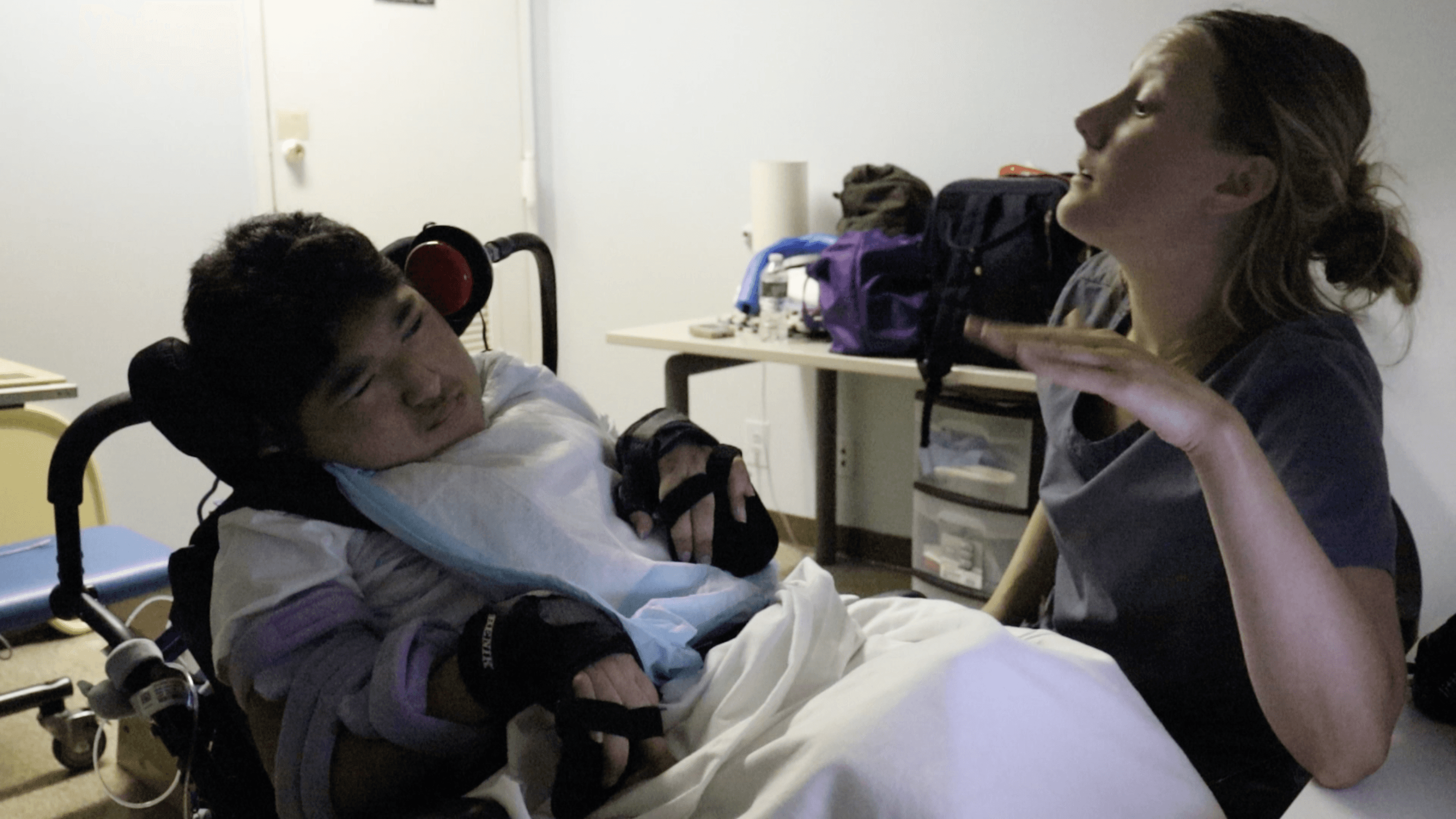
Billi and Jesus, Brooklyn, 2024
After losing Jesus I knew I needed to step away from healthcare - it was just simply too hard. I questioned whether UX was too big a leap, whether I was even smart enough for it.
Working at Oppia helped me find my footing again. It showed me what I had to offer - and how much I still had to learn. It reminded me that not all is lost.
This work means more to me than a career move. Hailey and Jesus shaped who I am as a researcher - the way I listen, the way I advocate, the way I never forget there's a real person behind every data point. I carry them with me into every room I walk into. They are truly my north star and helped me find my way (sorry to my users!)
Thank you for being here and taking the time to read this.
SECTION 1
About oppia
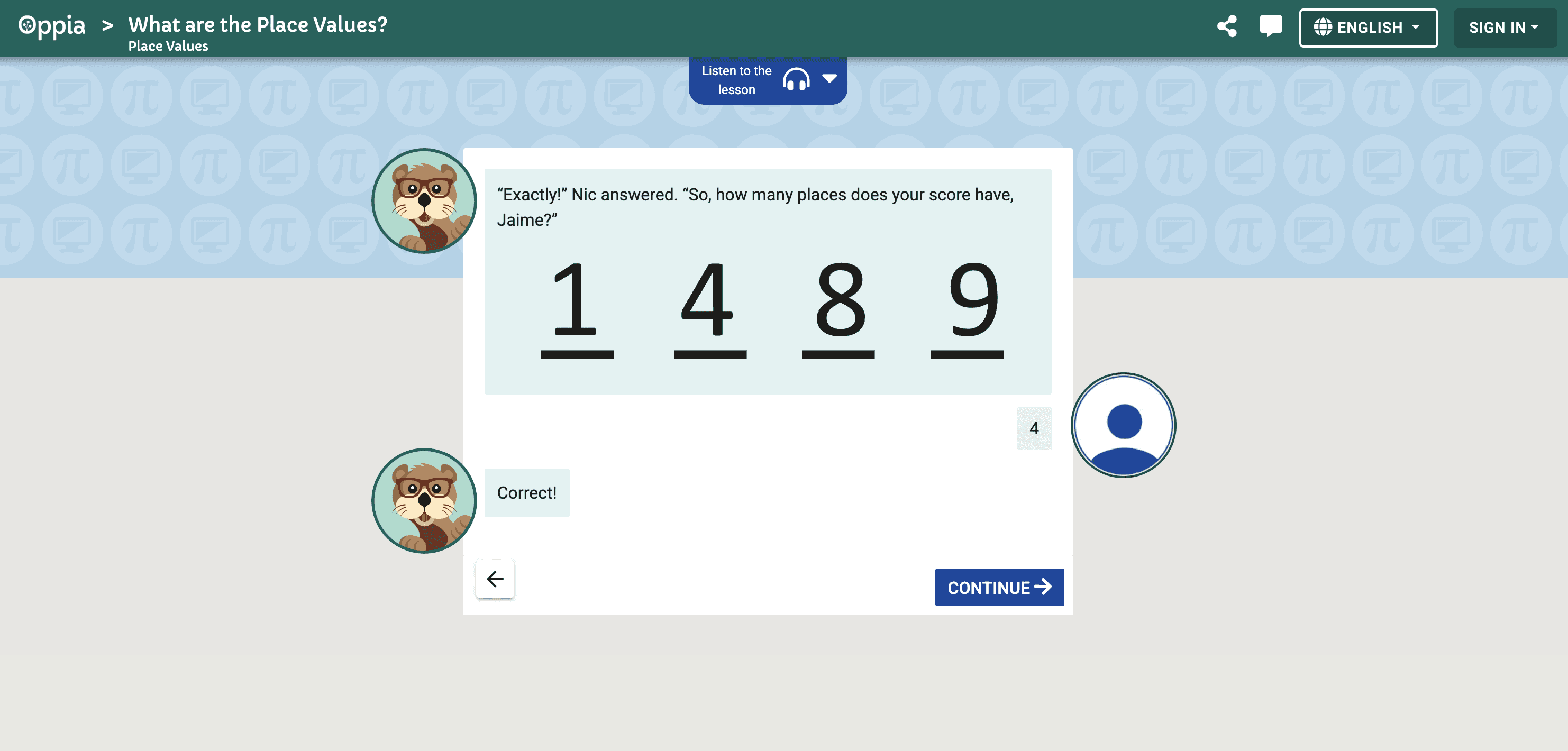
Oppia's in-product lesson view - adaptive, story-driven, and designed to feel like a one-on-one tutor
Understanding the platform before understanding the problem
WHAT IS OPPIA:
Oppia is a free, open-source online learning platform delivering interactive, story-based education to learners worldwide - particularly those without access to traditional schooling.
HOW IT WORKS:
Lessons simulate an interactive tutor - adapting to each learner's needs with targeted feedback, hints, and voiceovers in multiple languages.
WHO USES IT:
Students, parents, and teachers globally - with a focus on learners in Nigeria, India, Kenya and beyond. Available as a website and Android app.
SECTION 2
PROBLEM
Millions of learners. One question: what do we actually know about them?
When I joined, the org had no active research infrastructure - no defined primary user and no process for turning research into product decisions. As a team, we had many unanswered questions and didn't know where to start.
2023
Was the last year external user research was conducted
3 years
Gap between last known research and current redesign
2M +
Learners depending on decisions made without current data
The data obtained from real users, however, was outdated, geographically narrow, and hadn't been connected to current product decisions.
What prior research existed?
Research was completed in 2023 with children aged 7-14 with the study focus being student perceptions and experiences while navigating Oppia's platform.
Participants:
18 students (aged 7-14) and 8 parent interviews
Location:
Nigeria, India, Kenya, Brazil and Canada
Status when I joined:
Status when
I joined:
Existing but not actively informing current product decisions
The problem wasn't absence of data. It was absence of research infrastructure. When my stakeholder presentation asked "do we have any external data?", it surfaced years of user research that had never been connected to product decisions. The org had lost its research thread - and my team and I was here to help rebuild it.
SECTION 3
RESEARCH
our approach to this problem
Our initial research focused specifically on the logged out learner experience - the first impression a new visitor gets before ever creating an account. We focused on three methods, with each one answering a different question. Together - source triangulation.
Phase 1
Dogfood testing + thematic analysis
Team recorded 10-min sessions. I collected videos, transcribed them, and synthesized 4 pain points through thematic analysis across 11 participants.
Complete
Phase 2
Heuristic evaluation
5 team members independently audited the logged out learner experience using Chauncey Wilson's severity ratings across 12 usability dimensions.
Complete
Phase 3
External usability testing
First-ever external participant study. Testing newly redesigned Figma pages with real users — the org's first external research program.
In progress
METHOD
TELLS YOU…
STATUS
Heuristic Evaluation
Expert audit · Phase 2
What MIGHT be wrong
Generating hypotheses before testing with users
Complete
Dogfood Testing
Behavioral observation · Phase 1
IF the problem is real
Validating hypotheses with observed behavior and frequency data
Complete
Analytics / Funnels
Quantitative · Future
WHERE users drop off
Quantifying drop-off points by business impact
In progress
SECTION 4
Key findings
Three pain points surfaced consistently across both methods
Across both the dogfood testing and heuristic evaluation, three consistent themes emerged independently. Here's what we found - and what was driving each problem.
#1
Disorientation on arrival (home page)
8 of 11 participants · HE severity of 2.7
#2
Text heaviness across key pages
7 of 11 participants · confirmed by HE
#3
Navigation & Information Architecture Gaps
8 of 11 participants · HE severity of 2.3
HEURISTIC EVALUATION: SEVERITY SCALE (CHAUNCEY WILSON)
Our heuristic evaluation used Chauncey Wilson's severity scale to rate usability issues from 1 to 5 - where lower scores indicate more critical problems. This scale helped our team of 5 independent evaluators prioritize findings by impact, giving us a structured way to compare and validate what we observed.
1.
Usability catastrophe
Imperative to fix before launch
2.
Major usability problem
High priority fix - significantly impacts user experience
3.
Minor usability problem
Low priority - fix when time permits
4.
Cosmetic problem only
Fix if time permits
5.
Not a usability problem
Heuristic passed - no action needed
Note: Lower scores = more severe. Our top findings averaged 2.0–2.7, indicating major usability problems requiring high priority fixes.
Breaking down each pain point
PAIN POINT #1:
8 OUT OF 11 PARTICIPANTS
Disorientation on arrival
Our most universal finding, flagged in both studies.
"I feel disoriented, I don't know where to start."
Participant, dogfood testing session
"I think the major issue is people don't know what to click first."
Participant, dogfood testing session
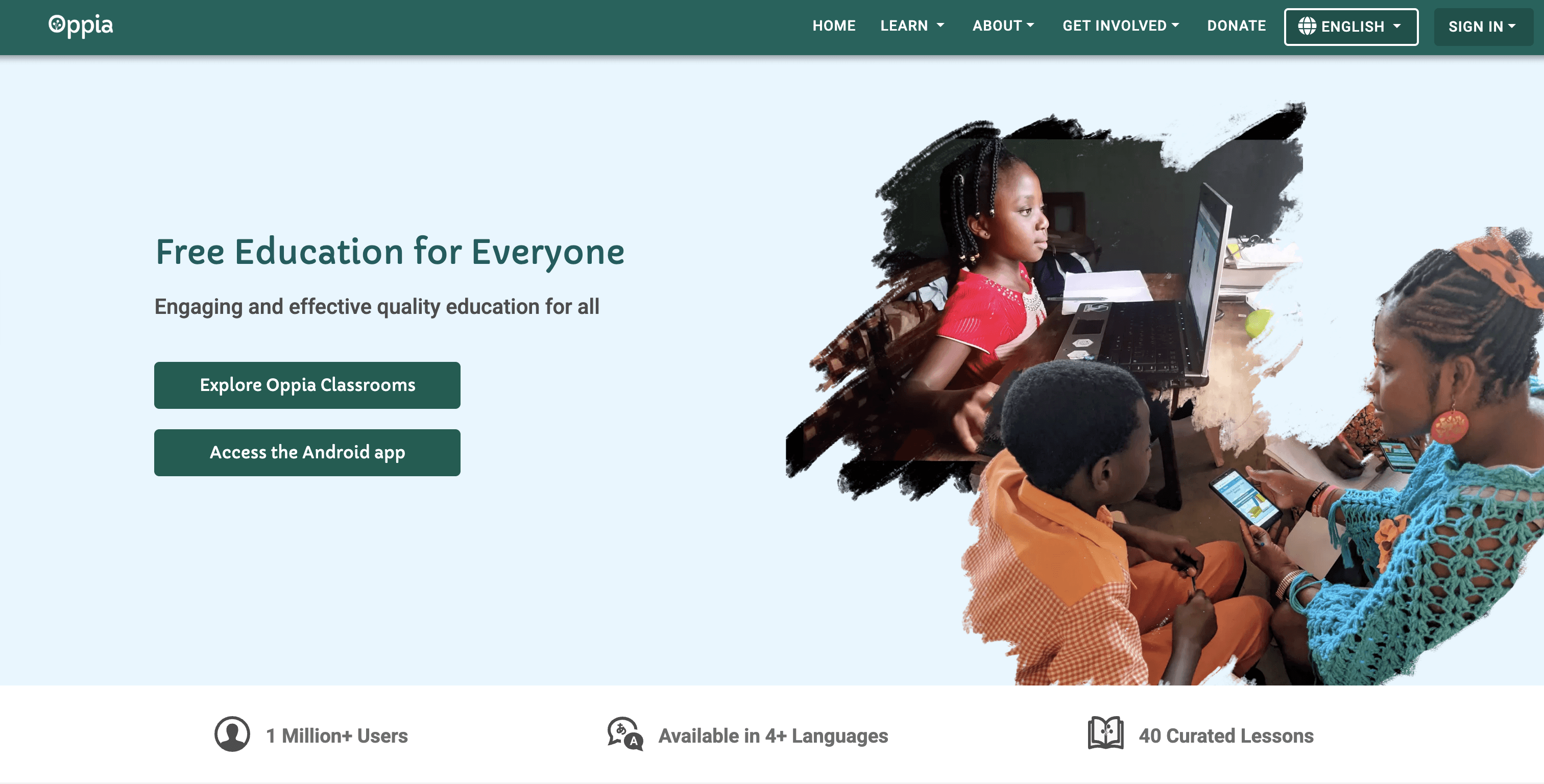
Oppia.org homepage
WHY THIS MATTERS
When users can't find their footing, they leave before seeing what Oppia can do. This single finding cascades into everything else.
WHAT'S DRIVING IT
—> No navigation indicator
Users can't tell where they are on the site
—> Two competing Call to Actions (CTAs)
Caused anxiety and prevented some users from exploring the rest of the nav
—> No onboarding flow
No "where to start" guidance for first time users
—> Inconsistent navigation dropdowns
Learn, About, Get Involved all behave and visually look different
ALSO FLAGGED BY HEURISTIC EVALUATION:
—> No personalization or routing for logged-out users
2.7
—> Donation pop-up fires before any value is shown
2.2
—> Getting to a lesson takes 4+ clicks from homepage
2.3
Severity scored using Chauncey Wilson's scale - lower scores indicate more critical problems requiring high priority fixes.
PAIN POINT #2:
7 OUT OF 11 PARTICIPANTS
Text heaviness across key pages
Too much text on key pages is causing users to drop off before they reach what matters. The density problem was most severe on the pages that need to convert users most.
"Very wordy... I don't really want to stop and read."
Participant, dogfood testing session
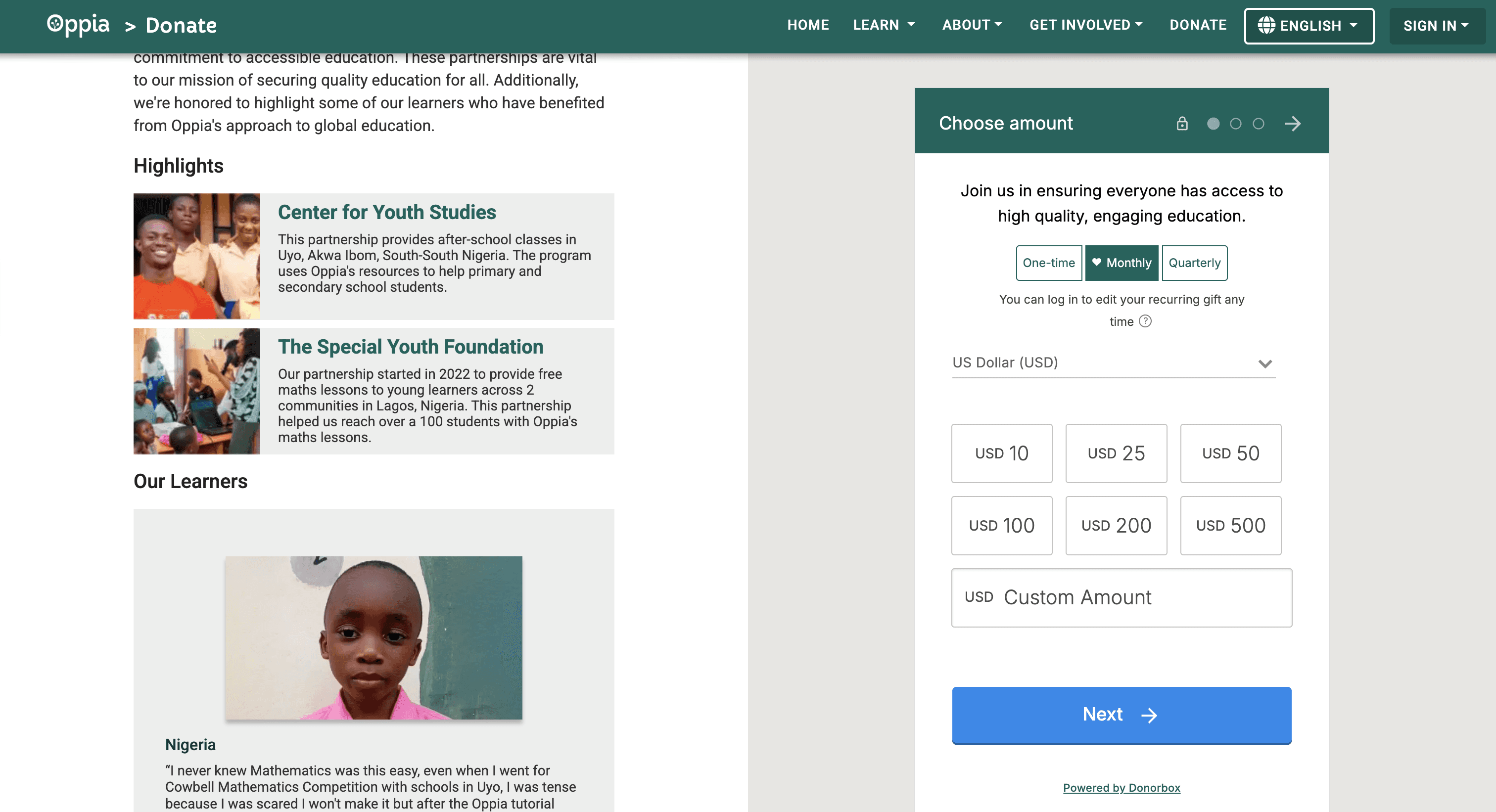
Oppia.org Donate page
WHERE USERS FELT IT MOST
—> Donate Page
Overwhelming amount of text before the donation CTA
—> Parents/teachers Guide
Dense copy deterring key adult decision-makers
—> About Section
Long-form content with no visual breaks
—> Volunteer Page
Text-heavy layout discouraging potential contributors
PAIN POINT #3:
8 OUT OF 11 PARTICIPANTS
Navigation & information architecture gaps
Key pages are buried and critical navigation pathways are broken - making it nearly impossible for users to find what they need.
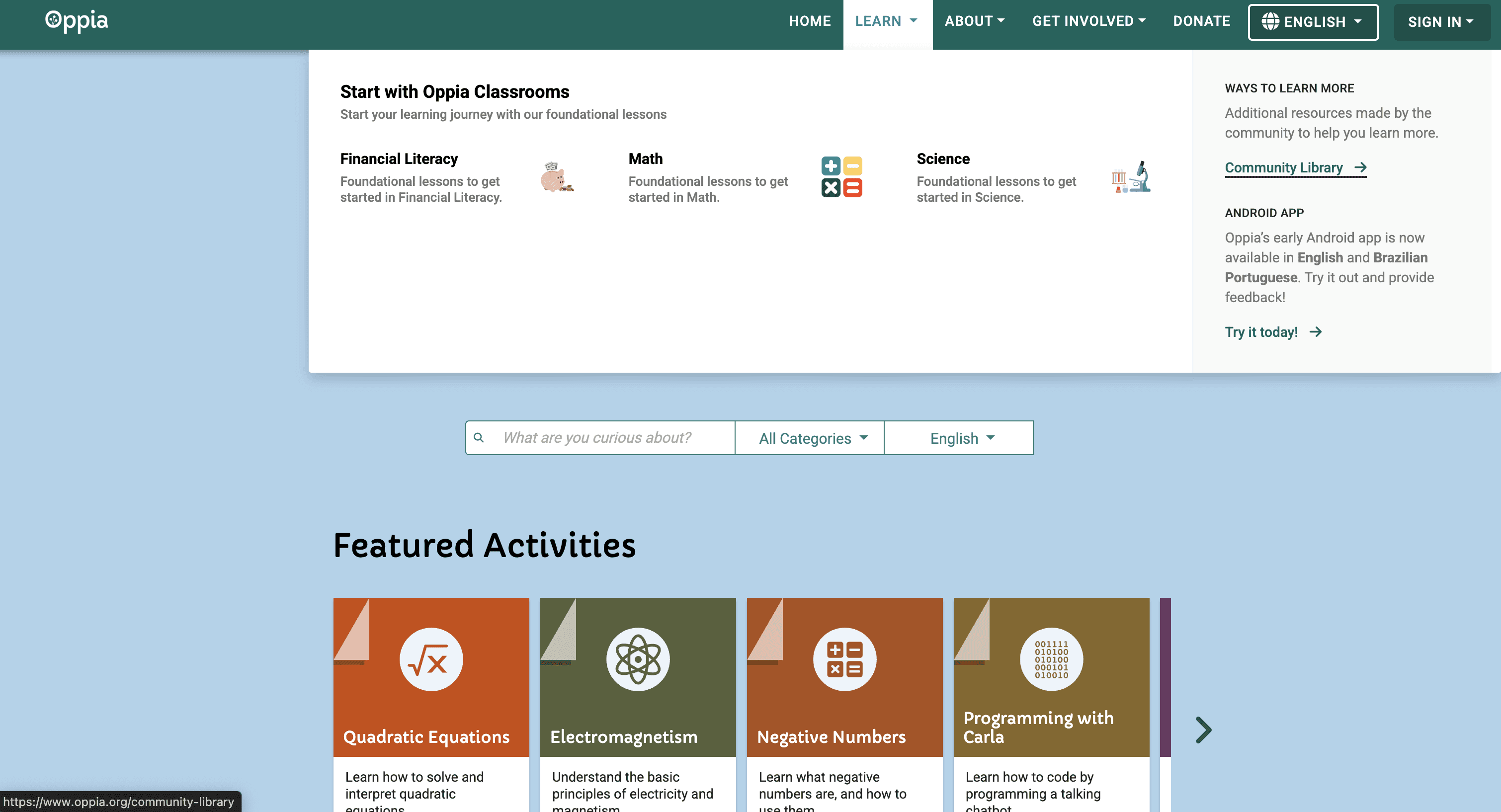
Oppia.org Community Library Page
WHY THIS MATTERS
Many of these pages builds trust with the adults who decide whether a child uses Oppia. If they can't find it, they can't get on board.
WHERE USERS FELT IT MOST
—> For Parents/Teachers page buried
Hidden in the About dropdown, people who need it most (parents and teachers) can't find it
—> In-lesson back navigation broken
Once inside a lesson, there's no clear path back. Users who exit lose their progress entirely with no warning or recovery option
—> Inconsistent navigation dropdowns
The Learn, About, and Get Involved dropdowns each have completely different layouts and behaviors, creating a disorienting and unpredictable navigation experience
—> Community Library hidden
One of Oppia's most powerful features is buried within the Learn dropdown (as pictured above), which may risk users never accessing it
ALSO FLAGGED BY HEURISTIC EVALUATION:
—> Navigation requires 4+ steps to reach a lesson
2.3
—> Post-lesson dead end - no "next lesson" CTA
2.3
—> Help/support not findable - footer only
2.0
Severity scored using Chauncey Wilson's scale - lower scores indicate more critical problems requiring high priority fixes.
Connecting the dots
How our heuristic evaluation findings reinforced what we heard in dogfood testing:
FINDING
SEVERITY
MAPS TO
No personalization or routing for logged-out users
2.7
(High Priority)
Pain #1
(Disorientation)
Navigation requires 4+ steps to reach a lesson
2.3
(High Priority)
Pain #3
(Navigation)
Post-lesson dead end - no "next lesson" CTA
2.3
(High Priority)
Pain #3
(Navigation)
Donation pop-up fires before any value is shown to user
2.2
(High Priority)
Pain #1
(Disorientation)
Help / support not findable - footer only
2.0
(High Priority)
Pain #3
(Navigation)
Two independent methods. One consistent signal
Both methods independently surfaced the same core themes: disorientation, content density, navigation gaps, and in-product confusion. Every heuristic evaluation finding was rated high priority fixes. This convergence is what source triangulation looks for - and it gave us the confidence to move forward.
SECTION 5
what we uncovered
The findings opened up bigger strategic questions the organization hadn't confronted yet:
No external user data existed
Every prior research effort used internal participants - meaning findings had never been validated with real users.
Primary user was undefined
Without knowing who the primary user was, the team couldn't set clear design goals or evaluate success meaningfully.
No design system existed
Inconsistent visual language made it impossible to recommend scalable fixes without a foundation to build on.
SECTION 6
how the research evolved
Every finding opened a new question. Every question expanded the roadmap.
FEBRUARY 2026
Joined Oppia. Got oriented. Turned existing data into actionable insights.
As part of onboarding, all new team members were assigned to complete a dogfood testing session on oppia.org as a first-time user
After sessions were completed, I noticed the recordings were sitting unused —> I recognized the opportunity, collected all videos, transcribed them, and conducted thematic analysis to surface 4 pain points that could actually inform product decisions
Took my findings and built a presentation to share with cross-functional stakeholders
Like many growing volunteer organizations, formal research infrastructure was still being established. I worked with what was available - and made it count.
Unlocked —>
Behavioral data showing users were consistently disoriented, overwhelmed by text, and unable to find key pathways - ready to present to stakeholders for the first time.
MARCH 2026
Presented findings to the UX writing team. The conversation opened up bigger questions.
Brought my team's concern to stakeholders - dogfood testing alone wasn't enough to make confident product decisions, and we needed external user data
The UX writing team responded by sharing a study Oppia had conducted in 2023 with children aged 7–14 (described previously), providing the study documentation and data for the team to review
This sparked a larger conversation about who Oppia's primary user actually was - a question neither team could confidently answer
Given this, both teams decided to re-establish the monthly UX Collab meeting, uniting UX research, writing, and design teams to align on goals and identify opportunities to support each other's work
Unlocked —>
Strategic alignment across teams, discovery of prior external research, and a regular cross-functional meeting that hadn't been happening consistently.
MARCH - APRIL 2026
Old data ruled out. Cross-team collaboration harder than expected.
Brought the 2023 children's studies back to my team - together determined it was too outdated to inform current decisions, confirming the need for fresh external research
Attempted to kick off the UX Collab meeting with designers - a communication gap meant they never saw the invite
Rather than letting momentum stall, tracked down their emails directly and asked to join one of their existing meetings - they responded warmly, sharing unreleased Figma pages with a defined design system and updated web and mobile designs
The path forward wasn't straightforward - but every obstacle clarified what we actually needed.
Unlocked —>
A direct relationship with the design team and confirmation that fresh external research was non-negotiable.
APRIL 2026
Heuristic evaluation complete. Findings synthesized for designers.
Each researcher independently evaluated the logged out learner experience using Chauncey Wilson's severity ratings across 12 dimensions
Combined heuristic findings with dogfood data to synthesize a presentation for the UX design team
Presentation covers our research process, key findings, and gaps - meeting happening next week (end of April)
The gaps were undeniable. The next step was clear - it is time to hear from real users.
Unlocked —>
Structural evidence validating dogfood findings - and a research story ready to bring to the design team.
APRIL 2026 - IN PARALLEL
Identified a quantitative gap. Took action.
Recognized that our internal findings alone couldn't show WHERE real users were dropping off or how often
Proactively reached out to the product analytics team to request traffic patterns, user flows, and drop-off metrics
Awaiting response - if confirmed, this would pair analytics data with our existing findings for a more complete picture
Internal findings tell you what's broken. Analytics tell you how often. We needed both.
Unlocked —>
Analytics data will allow us to quantify drop-off points and prioritize redesign fixes by business impact.
COMING NEXT
Proposing an external usability study.
Planning to propose external usability research on Oppia's current site and potentially the new Figma pages to the design team
Would involve recruiting real users - testing what still needs fixing before any redesign goes live
Building the research proposal and participant recruitment pipeline now
A potential barrier: participant compensation isn't available - recruiting teachers from my professional network who are willing to participate voluntarily, as Oppia is designed to be a classroom resource and their input is essential to understanding how to make it work for them
Everything we've learned so far has pointed here. It's time to hear from real users.
If confirmed —>
Closing the loop between internal findings and real user behavior.
SECTION 7
Reflection
Oppia was a place where research was still finding its footing - and I got to be part of shaping what that looked like. The dogfood testing and heuristic evaluation weren't just studies. They were the beginning of a conversation that helped the team get clearer, together, on who their users actually were.
What I loved most was the autonomy. There was no blueprint to follow - I could go in any direction I felt was right, make real decisions, and see them shape the direction of the research program. That kind of ownership pushed me to think more strategically than I ever had before.
I also discovered something I didn't expect: I love leading people. Meeting individually with researchers on my team and checking in on how they were doing, asking what I could be doing better as a lead, getting to know them as people - that became one of the most meaningful parts of this work.
One moment that stuck with me: when participant recruitment hit a wall, my background gave me something no one else on the team had - a direct line to teachers. Sometimes the most unexpected parts of your path turn out to be exactly what the work needs.
Research isn't just about answering questions. Sometimes it's about helping a team discover which questions to ask.
More Projects


Oppia Foundation - Building Research from the Ground Up
A mixed methods evaluative study for a free, open-source platform delivering interactive, story-based education to children globally.
Oppia Foundation is a free, open-source learning platform serving 2M+ learners globally. As Lead UX Researcher, I built a mixed methods research program from the ground up - surfacing key usability gaps through dogfood testing, thematic analysis, and heuristic evaluation, and laying the foundation for the org's upcoming external user research.
Overview
MY ROLE:
Lead UX Researcher (Volunteer) · Co-leading the UXR Team with a colleague
METHODS:
Dogfood Testing · Thematic Analysis · Heuristic Evaluation · Source Triangulation · Stakeholder Presentation · Usability Testing (in progress)
TOOLS:
Figma · Google Slides · Google Chat · Claude (AI)
TIMELINE:
Feb 2026 - Present
TEAM:
2 UX Research Leads · 4 UX Researchers · 2 UX Writers · 7 UX Designers
ORGANIZATION:
ORG
Oppia Foundation · Nonprofit · Google Summer of Code org · Remote · Volunteer
A Special Tribute: To Hailey and Jesus
Before Oppia, I worked directly with children as a speech-language pathologist. My last job as an SLP will always stay with me - it was both a breaking point and the thing that guided me to where I am today.
I worked at a school in Brooklyn. Unexpectedly, one of my students, Hailey, passed away (2024). Then, almost four months later, I lost another, Jesus. It was the hardest thing I've ever navigated professionally - and personally.
Hailey was 11. Spunky, hilarious, always dancing, and loved eating junk food.
Billi (Me) and Hailey in Brooklyn, 2024
Jesus was 18. He loved Adele, a good joke, and quiet spaces with the people he loved most.
Billi and Jesus, Brooklyn, 2024
After losing Jesus I knew I needed to step away from healthcare - it was just simply too hard. I questioned whether UX was too big a leap, whether I was even smart enough for it.
Working at Oppia helped me find my footing again. It showed me what I had to offer - and how much I still had to learn. It reminded me that not all is lost.
This work means more to me than a career move. Hailey and Jesus shaped who I am as a researcher - the way I listen, the way I advocate, the way I never forget there's a real person behind every data point. I carry them with me into every room I walk into. They are truly my north star and helped me find my way (sorry to my users!)
Thank you for being here and taking the time to read this.
SECTION 1
About oppia
Oppia's in-product lesson view - adaptive, story-driven, and designed to feel like a one-on-one tutor
Understanding the platform before understanding the problem
WHAT IS OPPIA:
Oppia is a free, open-source online learning platform delivering interactive, story-based education to learners worldwide - particularly those without access to traditional schooling.
HOW IT WORKS:
Lessons simulate an interactive tutor - adapting to each learner's needs with targeted feedback, hints, and voiceovers in multiple languages.
WHO USES IT:
Students, parents, and teachers globally - with a focus on learners in Nigeria, India, Kenya and beyond. Available as a website and Android app.
SECTION 2
PROBLEM
Millions of learners. One question: what do we actually know about them?
When I joined, the org had no active research infrastructure - no defined primary user and no process for turning research into product decisions. As a team, we had many unanswered questions and didn't know where to start.
2023
Was the last year external user research was conducted
3 years
Gap between last known research and current redesign
2M +
Learners depending on decisions made without current data
The data obtained from real users, however, was outdated, geographically narrow, and hadn't been connected to current product decisions.
What prior research existed?
Research was completed in 2023 with children aged 7-14 with the study focus being student perceptions and experiences while navigating Oppia's platform.
Participants:
18 students (aged 7-14) and 8 parent interviews
Location:
Nigeria, India, Kenya, Brazil and Canada
Status when I joined:
Status when
I joined:
Existing but not actively informing current product decisions
The problem wasn't absence of data. It was absence of research infrastructure. When my stakeholder presentation asked "do we have any external data?", it surfaced years of user research that had never been connected to product decisions. The org had lost its research thread - and my team and I was here to help rebuild it.
SECTION 3
RESEARCH
our approach to this problem
Our initial research focused specifically on the logged out learner experience - the first impression a new visitor gets before ever creating an account. We focused on three methods, with each one answering a different question. Together - source triangulation.
Phase 1
Dogfood testing + thematic analysis
Team recorded 10-min sessions. I collected videos, transcribed them, and synthesized 4 pain points through thematic analysis across 11 participants.
Complete
Phase 2
Heuristic evaluation
5 team members independently audited the logged out learner experience using Chauncey Wilson's severity ratings across 12 usability dimensions.
Complete
Phase 3
External usability testing
First-ever external participant study. Testing newly redesigned Figma pages with real users — the org's first external research program.
In progress
METHOD
TELLS YOU…
STATUS
Heuristic Evaluation
Expert audit · Phase 2
What MIGHT be wrong
Generating hypotheses before testing with users
Complete
Dogfood Testing
Behavioral observation · Phase 1
IF the problem is real
Validating hypotheses with observed behavior and frequency data
Complete
Analytics / Funnels
Quantitative · Future
WHERE users drop off
Quantifying drop-off points by business impact
In progress
SECTION 4
Key findings
Three pain points surfaced consistently across both methods
Across both the dogfood testing and heuristic evaluation, three consistent themes emerged independently. Here's what we found - and what was driving each problem.
#1
Disorientation on arrival (home page)
8 of 11 participants · HE severity of 2.7
#2
Text heaviness across key pages
7 of 11 participants · confirmed by HE
#3
Navigation & Information Architecture Gaps
8 of 11 participants · HE severity of 2.3
HEURISTIC EVALUATION: SEVERITY SCALE (CHAUNCEY WILSON)
Our heuristic evaluation used Chauncey Wilson's severity scale to rate usability issues from 1 to 5 - where lower scores indicate more critical problems. This scale helped our team of 5 independent evaluators prioritize findings by impact, giving us a structured way to compare and validate what we observed.
1.
Usability catastrophe
Imperative to fix before launch
2.
Major usability problem
High priority fix - significantly impacts user experience
3.
Minor usability problem
Low priority - fix when time permits
4.
Cosmetic problem only
Fix if time permits
5.
Not a usability problem
Heuristic passed - no action needed
Note: Lower scores = more severe. Our top findings averaged 2.0–2.7, indicating major usability problems requiring high priority fixes.
Breaking down each pain point
PAIN POINT #1:
8 OUT OF 11 PARTICIPANTS
Disorientation on arrival
Our most universal finding, flagged in both studies.
"I feel disoriented, I don't know where to start."
Participant, dogfood testing session
"I think the major issue is people don't know what to click first."
Participant, dogfood testing session
Oppia.org homepage
WHY THIS MATTERS
When users can't find their footing, they leave before seeing what Oppia can do. This single finding cascades into everything else.
WHAT'S DRIVING IT
—> No navigation indicator
Users can't tell where they are on the site
—> Two competing Call to Actions (CTAs)
Caused anxiety and prevented some users from exploring the rest of the nav
—> No onboarding flow
No "where to start" guidance for first time users
—> Inconsistent navigation dropdowns
Learn, About, Get Involved all behave and visually look different
ALSO FLAGGED BY HEURISTIC EVALUATION:
—> No personalization or routing for logged-out users
2.7
—> Donation pop-up fires before any value is shown
2.2
—> Getting to a lesson takes 4+ clicks from homepage
2.3
Severity scored using Chauncey Wilson's scale - lower scores indicate more critical problems requiring high priority fixes.
PAIN POINT #2:
7 OUT OF 11 PARTICIPANTS
Text heaviness across key pages
Too much text on key pages is causing users to drop off before they reach what matters. The density problem was most severe on the pages that need to convert users most.
"Very wordy... I don't really want to stop and read."
Participant, dogfood testing session
Oppia.org Donate page
WHERE USERS FELT IT MOST
—> Donate Page
Overwhelming amount of text before the donation CTA
—> Parents/teachers Guide
Dense copy deterring key adult decision-makers
—> About Section
Long-form content with no visual breaks
—> Volunteer Page
Text-heavy layout discouraging potential contributors
PAIN POINT #3:
8 OUT OF 11 PARTICIPANTS
Navigation & information architecture gaps
Key pages are buried and critical navigation pathways are broken - making it nearly impossible for users to find what they need.
Oppia.org Community Library Page
WHY THIS MATTERS
Many of these pages builds trust with the adults who decide whether a child uses Oppia. If they can't find it, they can't get on board.
WHERE USERS FELT IT MOST
—> For Parents/Teachers page buried
Hidden in the About dropdown, people who need it most (parents and teachers) can't find it
—> In-lesson back navigation broken
Once inside a lesson, there's no clear path back. Users who exit lose their progress entirely with no warning or recovery option
—> Inconsistent navigation dropdowns
The Learn, About, and Get Involved dropdowns each have completely different layouts and behaviors, creating a disorienting and unpredictable navigation experience
—> Community Library hidden
One of Oppia's most powerful features is buried within the Learn dropdown (as pictured above), which may risk users never accessing it
ALSO FLAGGED BY HEURISTIC EVALUATION:
—> Navigation requires 4+ steps to reach a lesson
2.3
—> Post-lesson dead end - no "next lesson" CTA
2.3
—> Help/support not findable - footer only
2.0
Severity scored using Chauncey Wilson's scale - lower scores indicate more critical problems requiring high priority fixes.
Connecting the dots
How our heuristic evaluation findings reinforced what we heard in dogfood testing:
FINDING
SEVERITY
MAPS TO
No personalization or routing for logged-out users
2.7
(High Priority)
Pain #1
(Disorientation)
Navigation requires 4+ steps to reach a lesson
2.3
(High Priority)
Pain #3
(Navigation)
Post-lesson dead end - no "next lesson" CTA
2.3
(High Priority)
Pain #3
(Navigation)
Donation pop-up fires before any value is shown to user
2.2
(High Priority)
Pain #1
(Disorientation)
Help / support not findable - footer only
2.0
(High Priority)
Pain #3
(Navigation)
Two independent methods. One consistent signal
Both methods independently surfaced the same core themes: disorientation, content density, navigation gaps, and in-product confusion. Every heuristic evaluation finding was rated high priority fixes. This convergence is what source triangulation looks for - and it gave us the confidence to move forward.
SECTION 5
what we uncovered
The findings opened up bigger strategic questions the organization hadn't confronted yet:
No external user data existed
Every prior research effort used internal participants - meaning findings had never been validated with real users.
Primary user was undefined
Without knowing who the primary user was, the team couldn't set clear design goals or evaluate success meaningfully.
No design system existed
Inconsistent visual language made it impossible to recommend scalable fixes without a foundation to build on.
SECTION 6
how the research evolved
Every finding opened a new question. Every question expanded the roadmap.
FEBRUARY 2026
Joined Oppia. Got oriented. Turned existing data into actionable insights.
As part of onboarding, all new team members were assigned to complete a dogfood testing session on oppia.org as a first-time user
After sessions were completed, I noticed the recordings were sitting unused —> I recognized the opportunity, collected all videos, transcribed them, and conducted thematic analysis to surface 4 pain points that could actually inform product decisions
Took my findings and built a presentation to share with cross-functional stakeholders
Like many growing volunteer organizations, formal research infrastructure was still being established. I worked with what was available - and made it count.
Unlocked —>
Behavioral data showing users were consistently disoriented, overwhelmed by text, and unable to find key pathways - ready to present to stakeholders for the first time.
MARCH 2026
Presented findings to the UX writing team. The conversation opened up bigger questions.
Brought my team's concern to stakeholders - dogfood testing alone wasn't enough to make confident product decisions, and we needed external user data
The UX writing team responded by sharing a study Oppia had conducted in 2023 with children aged 7–14 (described previously), providing the study documentation and data for the team to review
This sparked a larger conversation about who Oppia's primary user actually was - a question neither team could confidently answer
Given this, both teams decided to re-establish the monthly UX Collab meeting, uniting UX research, writing, and design teams to align on goals and identify opportunities to support each other's work
Unlocked —>
Strategic alignment across teams, discovery of prior external research, and a regular cross-functional meeting that hadn't been happening consistently.
MARCH - APRIL 2026
Old data ruled out. Cross-team collaboration harder than expected.
Brought the 2023 children's studies back to my team - together determined it was too outdated to inform current decisions, confirming the need for fresh external research
Attempted to kick off the UX Collab meeting with designers - a communication gap meant they never saw the invite
Rather than letting momentum stall, tracked down their emails directly and asked to join one of their existing meetings - they responded warmly, sharing unreleased Figma pages with a defined design system and updated web and mobile designs
The path forward wasn't straightforward - but every obstacle clarified what we actually needed.
Unlocked —>
A direct relationship with the design team and confirmation that fresh external research was non-negotiable.
APRIL 2026
Heuristic evaluation complete. Findings synthesized for designers.
Each researcher independently evaluated the logged out learner experience using Chauncey Wilson's severity ratings across 12 dimensions
Combined heuristic findings with dogfood data to synthesize a presentation for the UX design team
Presentation covers our research process, key findings, and gaps - meeting happening next week (end of April)
The gaps were undeniable. The next step was clear - it is time to hear from real users.
Unlocked —>
Structural evidence validating dogfood findings - and a research story ready to bring to the design team.
APRIL 2026 - IN PARALLEL
Identified a quantitative gap. Took action.
Recognized that our internal findings alone couldn't show WHERE real users were dropping off or how often
Proactively reached out to the product analytics team to request traffic patterns, user flows, and drop-off metrics
Awaiting response - if confirmed, this would pair analytics data with our existing findings for a more complete picture
Internal findings tell you what's broken. Analytics tell you how often. We needed both.
Unlocked —>
Analytics data will allow us to quantify drop-off points and prioritize redesign fixes by business impact.
COMING NEXT
Proposing an external usability study.
Planning to propose external usability research on Oppia's current site and potentially the new Figma pages to the design team
Would involve recruiting real users - testing what still needs fixing before any redesign goes live
Building the research proposal and participant recruitment pipeline now
A potential barrier: participant compensation isn't available - recruiting teachers from my professional network who are willing to participate voluntarily, as Oppia is designed to be a classroom resource and their input is essential to understanding how to make it work for them
Everything we've learned so far has pointed here. It's time to hear from real users.
If confirmed —>
Closing the loop between internal findings and real user behavior.
SECTION 7
Reflection
Oppia was a place where research was still finding its footing - and I got to be part of shaping what that looked like. The dogfood testing and heuristic evaluation weren't just studies. They were the beginning of a conversation that helped the team get clearer, together, on who their users actually were.
What I loved most was the autonomy. There was no blueprint to follow - I could go in any direction I felt was right, make real decisions, and see them shape the direction of the research program. That kind of ownership pushed me to think more strategically than I ever had before.
I also discovered something I didn't expect: I love leading people. Meeting individually with researchers on my team and checking in on how they were doing, asking what I could be doing better as a lead, getting to know them as people - that became one of the most meaningful parts of this work.
One moment that stuck with me: when participant recruitment hit a wall, my background gave me something no one else on the team had - a direct line to teachers. Sometimes the most unexpected parts of your path turn out to be exactly what the work needs.
Research isn't just about answering questions. Sometimes it's about helping a team discover which questions to ask.
More Projects
Oppia Foundation - Building Research from the Ground Up
A mixed methods evaluative study for a free, open-source platform delivering interactive, story-based education to children globally.
Oppia Foundation is a free, open-source learning platform serving 2M+ learners globally. As Lead UX Researcher, I built a mixed methods research program from the ground up - surfacing key usability gaps through dogfood testing, thematic analysis, and heuristic evaluation, and laying the foundation for the org's upcoming external user research.
Overview
MY ROLE:
Lead UX Researcher (Volunteer) · Co-leading the UXR Team with a colleague
METHODS:
Dogfood Testing · Thematic Analysis · Heuristic Evaluation · Source Triangulation · Stakeholder Presentation · Usability Testing (in progress)
TOOLS:
Figma · Google Slides · Google Chat · Claude (AI)
TIMELINE:
Feb 2026 - Present
TEAM:
2 UX Research Leads · 4 UX Researchers · 2 UX Writers · 7 UX Designers
ORGANIZATION:
ORG
Oppia Foundation · Nonprofit · Google Summer of Code org · Remote · Volunteer
A Special Tribute: To Hailey and Jesus
Before Oppia, I worked directly with children as a speech-language pathologist. My last job as an SLP will always stay with me - it was both a breaking point and the thing that guided me to where I am today.
I worked at a school in Brooklyn. Unexpectedly, one of my students, Hailey, passed away (2024). Then, almost four months later, I lost another, Jesus. It was the hardest thing I've ever navigated professionally - and personally.
Hailey was 11. Spunky, hilarious, always dancing, and loved eating junk food.
Billi (Me) and Hailey in Brooklyn, 2024
Jesus was 18. He loved Adele, a good joke, and quiet spaces with the people he loved most.
Billi and Jesus, Brooklyn, 2024
After losing Jesus I knew I needed to step away from healthcare - it was just simply too hard. I questioned whether UX was too big a leap, whether I was even smart enough for it.
Working at Oppia helped me find my footing again. It showed me what I had to offer - and how much I still had to learn. It reminded me that not all is lost.
This work means more to me than a career move. Hailey and Jesus shaped who I am as a researcher - the way I listen, the way I advocate, the way I never forget there's a real person behind every data point. I carry them with me into every room I walk into. They are truly my north star and helped me find my way (sorry to my users!)
Thank you for being here and taking the time to read this.
SECTION 1
About oppia
Oppia's in-product lesson view - adaptive, story-driven, and designed to feel like a one-on-one tutor
Understanding the platform before understanding the problem
WHAT IS OPPIA:
Oppia is a free, open-source online learning platform delivering interactive, story-based education to learners worldwide - particularly those without access to traditional schooling.
HOW IT WORKS:
Lessons simulate an interactive tutor - adapting to each learner's needs with targeted feedback, hints, and voiceovers in multiple languages.
WHO USES IT:
Students, parents, and teachers globally - with a focus on learners in Nigeria, India, Kenya and beyond. Available as a website and Android app.
SECTION 2
PROBLEM
Millions of learners. One question: what do we actually know about them?
When I joined, the org had no active research infrastructure - no defined primary user and no process for turning research into product decisions. As a team, we had many unanswered questions and didn't know where to start.
2023
Was the last year external user research was conducted
3 years
Gap between last known research and current redesign
2M +
Learners depending on decisions made without current data
The data obtained from real users, however, was outdated, geographically narrow, and hadn't been connected to current product decisions.
What prior research existed?
Research was completed in 2023 with children aged 7-14 with the study focus being student perceptions and experiences while navigating Oppia's platform.
Participants:
18 students (aged 7-14) and 8 parent interviews
Location:
Nigeria, India, Kenya, Brazil and Canada
Status when I joined:
Status when
I joined:
Existing but not actively informing current product decisions
The problem wasn't absence of data. It was absence of research infrastructure. When my stakeholder presentation asked "do we have any external data?", it surfaced years of user research that had never been connected to product decisions. The org had lost its research thread - and my team and I was here to help rebuild it.
SECTION 3
RESEARCH
our approach to this problem
Our initial research focused specifically on the logged out learner experience - the first impression a new visitor gets before ever creating an account. We focused on three methods, with each one answering a different question. Together - source triangulation.
Phase 1
Dogfood testing + thematic analysis
Team recorded 10-min sessions. I collected videos, transcribed them, and synthesized 4 pain points through thematic analysis across 11 participants.
Complete
Phase 2
Heuristic evaluation
5 team members independently audited the logged out learner experience using Chauncey Wilson's severity ratings across 12 usability dimensions.
Complete
Phase 3
External usability testing
First-ever external participant study. Testing newly redesigned Figma pages with real users — the org's first external research program.
In progress
METHOD
TELLS YOU…
STATUS
Heuristic Evaluation
Expert audit · Phase 2
What MIGHT be wrong
Generating hypotheses before testing with users
Complete
Dogfood Testing
Behavioral observation · Phase 1
IF the problem is real
Validating hypotheses with observed behavior and frequency data
Complete
Analytics / Funnels
Quantitative · Future
WHERE users drop off
Quantifying drop-off points by business impact
In progress
SECTION 4
Key findings
Three pain points surfaced consistently across both methods
Across both the dogfood testing and heuristic evaluation, three consistent themes emerged independently. Here's what we found - and what was driving each problem.
#1
Disorientation on arrival (home page)
8 of 11 participants · HE severity of 2.7
#2
Text heaviness across key pages
7 of 11 participants · confirmed by HE
#3
Navigation & Information Architecture Gaps
8 of 11 participants · HE severity of 2.3
HEURISTIC EVALUATION: SEVERITY SCALE (CHAUNCEY WILSON)
Our heuristic evaluation used Chauncey Wilson's severity scale to rate usability issues from 1 to 5 - where lower scores indicate more critical problems. This scale helped our team of 5 independent evaluators prioritize findings by impact, giving us a structured way to compare and validate what we observed.
1.
Usability catastrophe
Imperative to fix before launch
2.
Major usability problem
High priority fix - significantly impacts user experience
3.
Minor usability problem
Low priority - fix when time permits
4.
Cosmetic problem only
Fix if time permits
5.
Not a usability problem
Heuristic passed - no action needed
Note: Lower scores = more severe. Our top findings averaged 2.0–2.7, indicating major usability problems requiring high priority fixes.
Breaking down each pain point
PAIN POINT #1:
8 OUT OF 11 PARTICIPANTS
Disorientation on arrival
Our most universal finding, flagged in both studies.
"I feel disoriented, I don't know where to start."
Participant, dogfood testing session
"I think the major issue is people don't know what to click first."
Participant, dogfood testing session
Oppia.org homepage
WHY THIS MATTERS
When users can't find their footing, they leave before seeing what Oppia can do. This single finding cascades into everything else.
WHAT'S DRIVING IT
—> No navigation indicator
Users can't tell where they are on the site
—> Two competing Call to Actions (CTAs)
Caused anxiety and prevented some users from exploring the rest of the nav
—> No onboarding flow
No "where to start" guidance for first time users
—> Inconsistent navigation dropdowns
Learn, About, Get Involved all behave and visually look different
ALSO FLAGGED BY HEURISTIC EVALUATION:
—> No personalization or routing for logged-out users
2.7
—> Donation pop-up fires before any value is shown
2.2
—> Getting to a lesson takes 4+ clicks from homepage
2.3
Severity scored using Chauncey Wilson's scale - lower scores indicate more critical problems requiring high priority fixes.
PAIN POINT #2:
7 OUT OF 11 PARTICIPANTS
Text heaviness across key pages
Too much text on key pages is causing users to drop off before they reach what matters. The density problem was most severe on the pages that need to convert users most.
"Very wordy... I don't really want to stop and read."
Participant, dogfood testing session
Oppia.org Donate page
WHERE USERS FELT IT MOST
—> Donate Page
Overwhelming amount of text before the donation CTA
—> Parents/teachers Guide
Dense copy deterring key adult decision-makers
—> About Section
Long-form content with no visual breaks
—> Volunteer Page
Text-heavy layout discouraging potential contributors
PAIN POINT #3:
8 OUT OF 11 PARTICIPANTS
Navigation & information architecture gaps
Key pages are buried and critical navigation pathways are broken - making it nearly impossible for users to find what they need.
Oppia.org Community Library Page
WHY THIS MATTERS
Many of these pages builds trust with the adults who decide whether a child uses Oppia. If they can't find it, they can't get on board.
WHERE USERS FELT IT MOST
—> For Parents/Teachers page buried
Hidden in the About dropdown, people who need it most (parents and teachers) can't find it
—> In-lesson back navigation broken
Once inside a lesson, there's no clear path back. Users who exit lose their progress entirely with no warning or recovery option
—> Inconsistent navigation dropdowns
The Learn, About, and Get Involved dropdowns each have completely different layouts and behaviors, creating a disorienting and unpredictable navigation experience
—> Community Library hidden
One of Oppia's most powerful features is buried within the Learn dropdown (as pictured above), which may risk users never accessing it
ALSO FLAGGED BY HEURISTIC EVALUATION:
—> Navigation requires 4+ steps to reach a lesson
2.3
—> Post-lesson dead end - no "next lesson" CTA
2.3
—> Help/support not findable - footer only
2.0
Severity scored using Chauncey Wilson's scale - lower scores indicate more critical problems requiring high priority fixes.
Connecting the dots
How our heuristic evaluation findings reinforced what we heard in dogfood testing:
FINDING
SEVERITY
MAPS TO
No personalization or routing for logged-out users
2.7
(High Priority)
Pain #1
(Disorientation)
Navigation requires 4+ steps to reach a lesson
2.3
(High Priority)
Pain #3
(Navigation)
Post-lesson dead end - no "next lesson" CTA
2.3
(High Priority)
Pain #3
(Navigation)
Donation pop-up fires before any value is shown to user
2.2
(High Priority)
Pain #1
(Disorientation)
Help / support not findable - footer only
2.0
(High Priority)
Pain #3
(Navigation)
Two independent methods. One consistent signal
Both methods independently surfaced the same core themes: disorientation, content density, navigation gaps, and in-product confusion. Every heuristic evaluation finding was rated high priority fixes. This convergence is what source triangulation looks for - and it gave us the confidence to move forward.
SECTION 5
what we uncovered
The findings opened up bigger strategic questions the organization hadn't confronted yet:
No external user data existed
Every prior research effort used internal participants - meaning findings had never been validated with real users.
Primary user was undefined
Without knowing who the primary user was, the team couldn't set clear design goals or evaluate success meaningfully.
No design system existed
Inconsistent visual language made it impossible to recommend scalable fixes without a foundation to build on.
SECTION 6
how the research evolved
Every finding opened a new question. Every question expanded the roadmap.
FEBRUARY 2026
Joined Oppia. Got oriented. Turned existing data into actionable insights.
As part of onboarding, all new team members were assigned to complete a dogfood testing session on oppia.org as a first-time user
After sessions were completed, I noticed the recordings were sitting unused —> I recognized the opportunity, collected all videos, transcribed them, and conducted thematic analysis to surface 4 pain points that could actually inform product decisions
Took my findings and built a presentation to share with cross-functional stakeholders
Like many growing volunteer organizations, formal research infrastructure was still being established. I worked with what was available - and made it count.
Unlocked —>
Behavioral data showing users were consistently disoriented, overwhelmed by text, and unable to find key pathways - ready to present to stakeholders for the first time.
MARCH 2026
Presented findings to the UX writing team. The conversation opened up bigger questions.
Brought my team's concern to stakeholders - dogfood testing alone wasn't enough to make confident product decisions, and we needed external user data
The UX writing team responded by sharing a study Oppia had conducted in 2023 with children aged 7–14 (described previously), providing the study documentation and data for the team to review
This sparked a larger conversation about who Oppia's primary user actually was - a question neither team could confidently answer
Given this, both teams decided to re-establish the monthly UX Collab meeting, uniting UX research, writing, and design teams to align on goals and identify opportunities to support each other's work
Unlocked —>
Strategic alignment across teams, discovery of prior external research, and a regular cross-functional meeting that hadn't been happening consistently.
MARCH - APRIL 2026
Old data ruled out. Cross-team collaboration harder than expected.
Brought the 2023 children's studies back to my team - together determined it was too outdated to inform current decisions, confirming the need for fresh external research
Attempted to kick off the UX Collab meeting with designers - a communication gap meant they never saw the invite
Rather than letting momentum stall, tracked down their emails directly and asked to join one of their existing meetings - they responded warmly, sharing unreleased Figma pages with a defined design system and updated web and mobile designs
The path forward wasn't straightforward - but every obstacle clarified what we actually needed.
Unlocked —>
A direct relationship with the design team and confirmation that fresh external research was non-negotiable.
APRIL 2026
Heuristic evaluation complete. Findings synthesized for designers.
Each researcher independently evaluated the logged out learner experience using Chauncey Wilson's severity ratings across 12 dimensions
Combined heuristic findings with dogfood data to synthesize a presentation for the UX design team
Presentation covers our research process, key findings, and gaps - meeting happening next week (end of April)
The gaps were undeniable. The next step was clear - it is time to hear from real users.
Unlocked —>
Structural evidence validating dogfood findings - and a research story ready to bring to the design team.
APRIL 2026 - IN PARALLEL
Identified a quantitative gap. Took action.
Recognized that our internal findings alone couldn't show WHERE real users were dropping off or how often
Proactively reached out to the product analytics team to request traffic patterns, user flows, and drop-off metrics
Awaiting response - if confirmed, this would pair analytics data with our existing findings for a more complete picture
Internal findings tell you what's broken. Analytics tell you how often. We needed both.
Unlocked —>
Analytics data will allow us to quantify drop-off points and prioritize redesign fixes by business impact.
COMING NEXT
Proposing an external usability study.
Planning to propose external usability research on Oppia's current site and potentially the new Figma pages to the design team
Would involve recruiting real users - testing what still needs fixing before any redesign goes live
Building the research proposal and participant recruitment pipeline now
A potential barrier: participant compensation isn't available - recruiting teachers from my professional network who are willing to participate voluntarily, as Oppia is designed to be a classroom resource and their input is essential to understanding how to make it work for them
Everything we've learned so far has pointed here. It's time to hear from real users.
If confirmed —>
Closing the loop between internal findings and real user behavior.
SECTION 7
Reflection
Oppia was a place where research was still finding its footing - and I got to be part of shaping what that looked like. The dogfood testing and heuristic evaluation weren't just studies. They were the beginning of a conversation that helped the team get clearer, together, on who their users actually were.
What I loved most was the autonomy. There was no blueprint to follow - I could go in any direction I felt was right, make real decisions, and see them shape the direction of the research program. That kind of ownership pushed me to think more strategically than I ever had before.
I also discovered something I didn't expect: I love leading people. Meeting individually with researchers on my team and checking in on how they were doing, asking what I could be doing better as a lead, getting to know them as people - that became one of the most meaningful parts of this work.
One moment that stuck with me: when participant recruitment hit a wall, my background gave me something no one else on the team had - a direct line to teachers. Sometimes the most unexpected parts of your path turn out to be exactly what the work needs.
Research isn't just about answering questions. Sometimes it's about helping a team discover which questions to ask.